Bulk Indexing Checker: Verify 10,000 URLs at Once
A bulk indexing checker does one job: it takes a list of URLs — hundreds or thousands at a time — and tells you which ones Google has indexed. For anyone managing backlink campaigns or large sites, it replaces a task that is physically impossible to do by hand.
This guide is about operating at scale. If you want a comparison of free and paid checking methods, our guide to bulk checking backlinks covers that. If you need to check a single page, start with how to check if a URL is indexed. Here we cover what a bulk indexing checker actually does, why checking breaks down at volume, and a repeatable workflow for verifying 10,000 URLs without losing accuracy.
What a bulk indexing checker actually does
You upload or paste a URL list. The tool queries Google for each URL. It returns a per-URL verdict: indexed or not indexed. Good ones let you export the results. The output then slots straight into a client report or a spreadsheet you already use.
The key word is per-URL. A total ("62% of your links are indexed") is a health metric. A per-URL report is a work queue. It tells you exactly which links need action. At scale, that difference decides whether the check was useful or just interesting.
Why 10,000 URLs is a different problem
Every manual checking method degrades as volume grows. This is why bulk indexing checkers exist as a category.
The site: operator stops cooperating
Checking one URL with a site: search takes about 30 seconds. Checking thousands means thousands of searches. Google starts serving CAPTCHAs long before you finish. Google has also confirmed that site: results are not a complete view of the index. So even the answers you get are approximate. As a spot check it is fine. As an audit method it fails.
Search Console only covers sites you own
Google Search Console is the most authoritative source — for your own properties. Backlinks live on other people's sites. You cannot inspect URLs on properties you have not verified. Even for your own site, the URL Inspection API is capped at 2,000 inspections per property per day. A 10,000-URL site audit takes a week through that route.
Time makes manual checking impossible
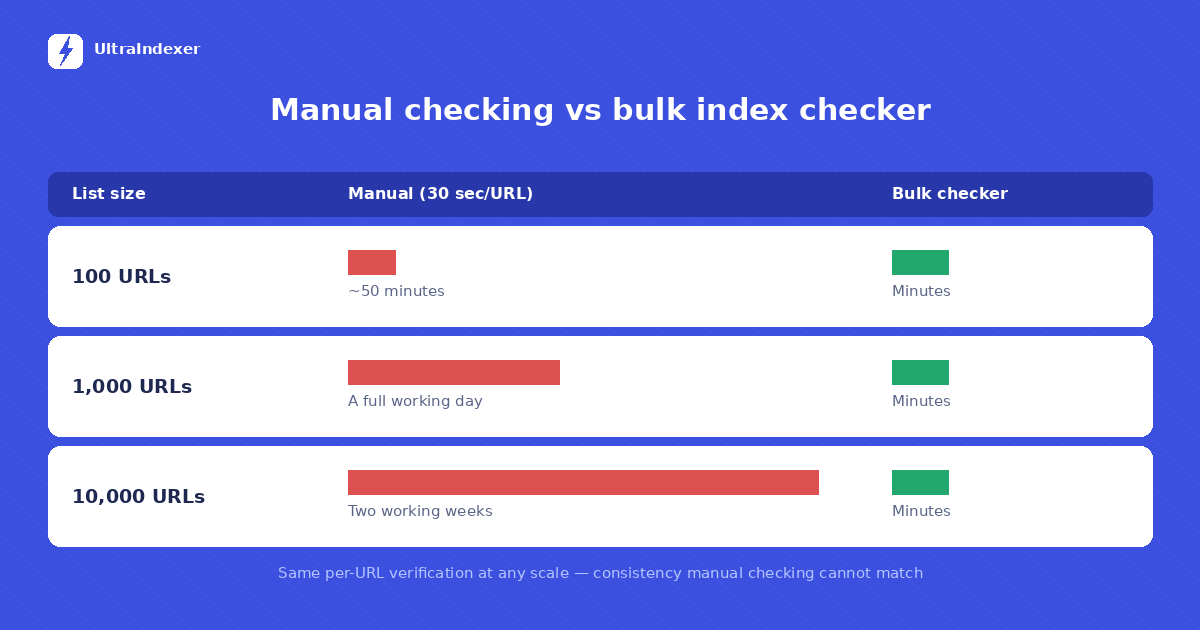
The arithmetic is blunt. At 30 seconds per manual check, 100 URLs cost you most of an hour. 1,000 URLs is a full working day of nothing else. 10,000 URLs is two working weeks. And the result starts going stale the moment you finish, because index status changes daily. A bulk indexing checker runs the same list in minutes. Every URL gets the same treatment.
What to look for in a bulk indexing checker
Tools in this category differ more than their landing pages suggest. Five things matter in practice.
Per-URL results, not just totals. You need the list of unindexed URLs, because that list is what you act on.
Honest batch limits. Every tool has a per-check ceiling. What matters is whether large lists are supported through clean batching — 10,000 URLs as two runs of 5,000 is fine; 10,000 runs of one is not. The free index checker limits we verified sit well below that — most cap at 5 to 1,000 URLs.
Export. CSV or spreadsheet export turns a check into a deliverable. If results live only inside a dashboard, agency reporting becomes copy-paste work.
Pricing that matches audit behaviour. Index checking is bursty — a big audit this week, nothing for three weeks. Pay-as-you-go credits fit that pattern; monthly subscriptions bill you for the quiet weeks. Watch for credits that expire.
A path from checking to fixing. Finding 2,400 unindexed backlinks is a diagnosis, not a cure. A checker that connects to an indexing workflow saves you exporting from one tool to import into another.
The 10,000-URL workflow
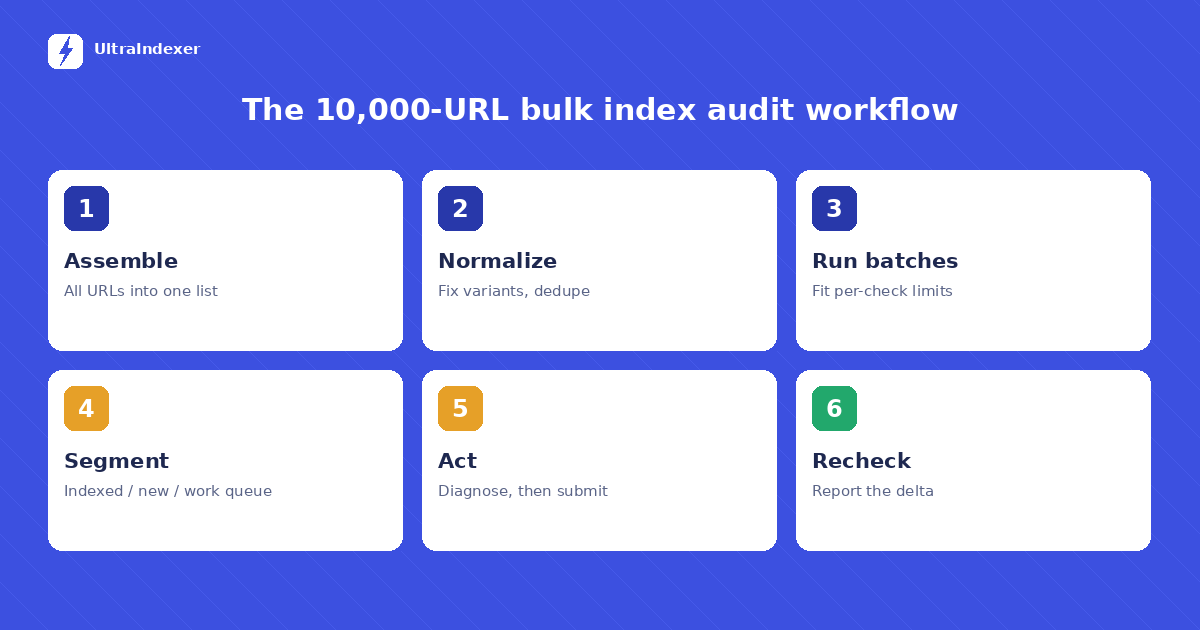
This is the repeatable process for a large bulk index check — the same six stages whether the list is 500 URLs or 10,000.
1. Assemble the list. Pull every URL you care about into one sheet: link-building placements, tier-2 properties, guest posts, client deliverables. For site audits, export from your crawler or sitemap.
2. Normalize and dedupe. This step decides the accuracy of everything after it. Strip tracking parameters. Resolve http vs https and www vs non-www to the version that actually serves. Remove duplicates. Checking the wrong variant of a URL produces a false "not indexed". It is the most common self-inflicted error in bulk index checking.
3. Run in batches. Split the list to fit your tool's per-check limit and run the batches. Keep a consistent naming scheme (client-month-batch) so results stay traceable later, and so the recheck in stage six compares like with like.
4. Segment the results. Three buckets: indexed (no action), not indexed and recently placed (normal — indexing takes time), not indexed and older than a few weeks (the work queue). The third bucket is why you ran the check.
5. Act on the work queue. First rule out hard blockers — a noindex tag or robots.txt rule on the linking page means no amount of waiting helps. Our guide to backlinks not getting indexed covers the full diagnosis. What remains is indexable-but-not-indexed, and those URLs go to an indexing service.
6. Recheck and compare. Re-run the work queue after your indexing cycle completes and compare against the first pass. The delta — URLs that moved from not indexed to indexed — is the number that goes in the client report.
Common mistakes in large index checks
Most bad audit data comes from four avoidable errors, not from the tools.
Checking the wrong URL variant. A backlink report says http, the live page serves https. You check the http version and record a false "not indexed". Always normalize the list to the URLs that actually serve before any bulk index check.
Checking too soon. A link placed on Monday and checked on Wednesday will usually show as not indexed — and that is normal, not a problem. New pages take days to weeks to enter the index. Checking before indexing has had time to happen fills your work queue with URLs that would have resolved on their own.
Treating one check as permanent truth. Index status is a snapshot. Pages drop out of Google's index without warning, and pages that were missing show up later. A March report does not describe June. This is the whole case for a recheck cadence.
Acting on the whole "not indexed" bucket at once. Sending every unindexed URL straight to an indexing service wastes credits on pages with hard blockers. Rule out noindex tags and robots.txt blocks first, then submit what is actually indexable. The work queue should shrink before it gets actioned.
Your own pages vs backlinks
A bulk indexing checker treats every URL the same, but what you do with the results differs by ownership.
For your own pages, you have full control. An unindexed page on your site points to something you can fix directly — internal linking, content quality, crawl blocks — and you can confirm the fix in Search Console. For a full method-by-method breakdown, see how to check if a URL is indexed.
For backlinks, you control almost nothing about the linking page. You cannot edit the site, fix its tags, or make Google crawl it on demand. What you can do is verify the status in bulk, diagnose which links have hard blockers, and push the indexable rest through an indexing service. That constraint is exactly why bulk index checking matters more for link builders than for anyone else — it is the only visibility you get.
How often should you run bulk checks?
Three triggers cover most teams. After link delivery: check new placements two to four weeks after they go live, once normal indexing has had time to happen. After indexing submissions: recheck when the service's cycle completes — with UltraIndexer that is the 7-day verified window. And on a calendar: run a monthly or quarterly full-portfolio check. Google removes pages from its index without notifying anyone. Links you reported as live in March can be gone by June.
Between full checks, avoid the temptation to recheck everything weekly. Index status does not change fast enough to justify it, and portfolio-wide rechecks burn credits on URLs that were fine last week. Check the work queue often; check the whole portfolio on a schedule.
Turning results into a client report
For agencies, the check is only half the job. The other half is showing the client what it means. A good report needs three numbers and one list.
The three numbers: how many links were checked, how many are indexed, and how the indexed count changed since the last report. The change is the number clients actually care about. It shows the work is compounding.
The one list: the URLs currently in the work queue, with a short status for each — waiting on normal indexing, blocked at the source, or submitted for indexing. This list is what separates an agency that verifies its links from one that just delivers them.
Keep the raw export attached to the report. Some clients will never open it. The ones who do will trust every report you send after that, because the numbers can be traced to individual URLs.
The cost math at scale
Value your time at even a modest hourly rate, and manual checking is the most expensive method there is. Two working weeks of effort for a 10,000-URL audit costs more than any tool on the market. That is before counting the errors that creep in around hour three. Bulk checking flips the equation. Each extra URL costs a fraction of a cent and zero extra time. And the consistency is perfect — URL number 9,999 gets the same verification as URL number one.
The practical consequence: teams that adopt a bulk indexing checker stop rationing their checks. Audits move from "when a client complains" to a standing monthly process, and indexing problems get caught while they are still cheap to fix.
Frequently asked questions
What is a bulk indexing checker?
A tool that checks a list of URLs against Google's index and returns a per-URL indexed or not-indexed status. It replaces manual one-at-a-time checking for large URL lists such as backlink portfolios, site audits, and client campaigns.
How many URLs can you check at once?
Per-check limits vary by tool. UltraIndexer accepts up to 5,000 URLs per check, so a 10,000-URL audit runs as two batches. Batching is normal at this scale — what matters is per-URL results and clean exports across batches.
Is the site: operator reliable for bulk checking?
No. Google has confirmed site: results are not a complete reflection of the index, and running thousands of manual searches triggers CAPTCHAs. It works as a spot check for a handful of URLs, not as an audit method.
Can you check URLs you don't own?
Yes — that is the main reason bulk indexing checkers exist. Google Search Console only covers verified properties, so backlinks on third-party sites can only be verified by checking Google's index directly.
Do bulk index checkers work for site audits too?
Yes. The workflow is identical for your own site: export URLs from your crawler or sitemap, normalize, run the check, and segment. It is the fastest way to find pages Google has quietly dropped, especially on large sites where Search Console reports lag behind and per-URL inspection is capped per day.
How often should you run a bulk index check?
Two to four weeks after new links go live, after each indexing submission cycle completes, and on a monthly or quarterly schedule for the full portfolio to catch deindexing.
Run your first bulk check
A bulk indexing checker turns index status from a guess into a spreadsheet. UltraIndexer's bulk index checker checks up to 5,000 URLs per run directly against Google, returns a per-URL report you can export, and connects straight to indexing for the URLs that need help — check, fix, recheck in one place. See checking plans — pay as you go, credits never expire.