How to Bulk Check If Your Backlinks Are Indexed (Free + Paid Methods)
You've built the links. You've done the outreach, written the guest posts, placed the citations. Now the real question: how many of those backlinks has Google actually indexed?
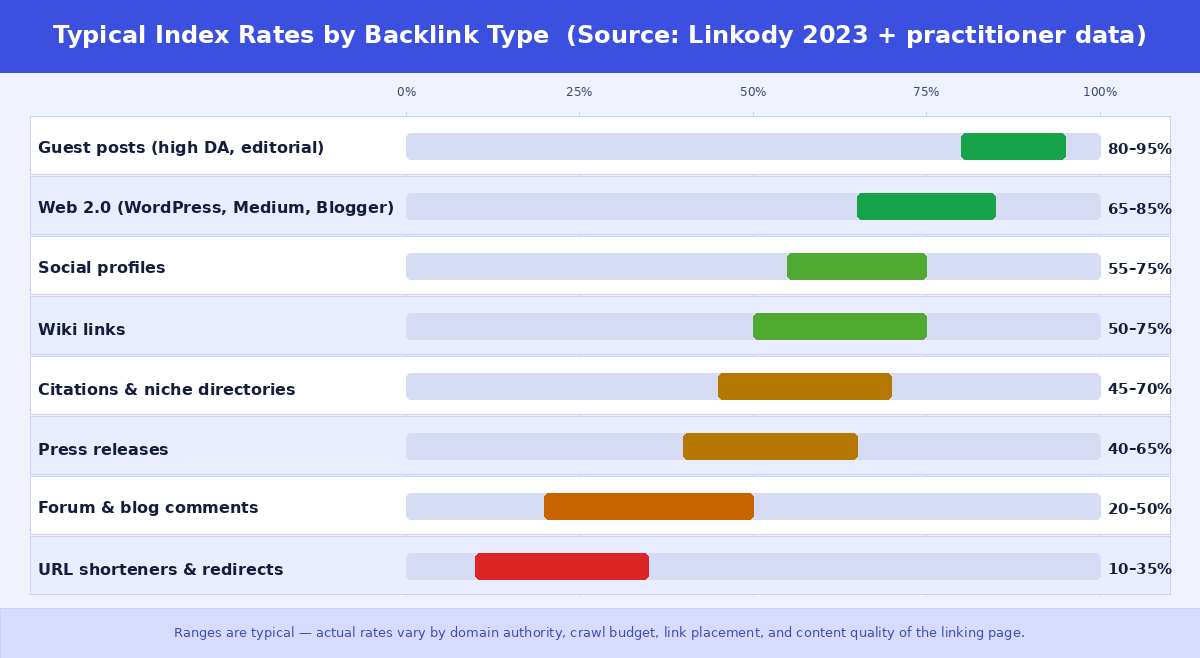
According to a 2023 study by Linkody analysing backlink indexation across thousands of campaigns, around 16% of backlinks across all link types never get indexed by Google. For lower-quality link types — blog comments, web 2.0s, forum profiles — that number climbs above 60%. In practical terms, if you're building 500 links a month with an average mix of link types, you could easily have 100–300 of them doing absolutely nothing for your rankings.
The problem is that most SEOs discover this too late — months into a campaign, when rankings haven't moved as expected. The fix is straightforward: check which links are indexed before you report results, before you scale a supplier relationship, and before you assume your link building is working.
This guide covers every practical method for bulk checking backlink index status in 2026 — from free options with serious limitations to paid tools built for scale — and explains exactly when and how to use each one. For the operational playbook at 10,000-URL scale — batching, segmentation, and recheck cadence — see our bulk indexing checker guide.
Why checking backlink index status matters for your rankings
Google's ranking algorithm only counts backlinks it has indexed. A link that exists on a live page but hasn't been crawled and added to Google's index is, from a rankings perspective, the same as a link that doesn't exist at all. It passes no authority, no anchor text signal, nothing.
This is different from whether the page itself is live. A page can be publicly accessible, returning a 200 status code, and completely outside Google's index at the same time. The two are independent. Your link building supplier can show you a live, working link on a live, working page — and that link can still be contributing zero to your SEO.
The link types most vulnerable to non-indexation are exactly the ones used at high volume in link building campaigns: web 2.0 properties, niche citations, forum profiles, blog comments, and second-tier links. High-DA guest posts on editorial sites index reliably. The long tail of link building does not.
Running a bulk index check before reporting results to a client or scaling a campaign answers three questions you should always know the answers to:
- What percentage of my delivered links are actually indexed?
- Which specific URLs need attention before I consider the campaign complete?
- Is my link building supplier actually delivering indexed links, or just live pages?
The fundamental limitation of manual checking methods
Before covering bulk methods, it's worth being precise about why the obvious free methods don't work at scale. Each has a specific ceiling that makes it impractical for real campaign volumes.
Method 1 — The site: operator (free, any URL, severe limitations)
The site: operator is the fastest way to check whether any individual URL is indexed. Type site:https://example.com/specific-page into Google and press Enter. If the page appears in results, Google has it in its index. If nothing appears, it may not be indexed.
The important qualifier is "may not be." Google's site: operator is known to be incomplete — it shows a subset of indexed pages, not a comprehensive list. A page can be in Google's index and still return no results from the site: query, particularly for lower-authority pages that haven't appeared in search results recently. A blank result is a signal, not a definitive answer.
The practical ceiling for the site: operator is around 10–20 URLs before the process becomes too slow to be useful. For a link building campaign delivering 200 links, manually running 200 site: queries takes the better part of an hour. For 1,000 links, it's physically impractical. For anything at agency scale, it isn't a viable option.
Use the site: operator for quick individual checks when you want a fast answer on a single URL and don't need certainty. Don't rely on it for campaign-level verification.
Method 2 — Google Search Console (free, high accuracy, restricted to your own sites)
Google Search Console gives you the most accurate indexing data available for any page — but only for pages on properties you've verified and own. This is the critical limitation for backlink checking: you cannot use Google Search Console to check the index status of a backlink on someone else's domain.
For checking your own pages, GSC URL Inspection is excellent. For checking whether a backlink on a third-party site is indexed, it's completely unusable.
There are also daily limits worth understanding clearly, because they're commonly confused:
- Manual request indexing (URL Inspection tool in the GSC dashboard): Google caps this at approximately 10–12 URLs per day per property. Google doesn't publish the exact limit officially, but this is the figure consistently reported by practitioners. Exceeding it returns a "Quota Exceeded" message.
- URL Inspection API (for developers): 2,000 queries per day per property. This is for programmatic status checking, not manual use — and still restricted to properties you own.
The second fundamental limitation is property verification. To use GSC on any domain, you need to verify ownership — adding a DNS record, uploading a file, or adding a meta tag. For your own site, this is trivial. For a backlink on a guest post site, a web 2.0 property, or any URL in your link profile, it's impossible. You don't own those sites.
Use Google Search Console for monitoring your own site's indexing health and diagnosing why specific pages on your own properties aren't being indexed. Don't attempt to use it for backlink verification.
Method 3 — Bulk Google index checker tools (the only practical solution at scale)
For checking backlinks at any meaningful volume, a dedicated bulk index checker is the only viable approach. These tools query Google directly for each URL, return an indexed or not-indexed status, and let you process hundreds or thousands of URLs in the time it would take to manually check a handful.
The key capabilities to look for in a bulk index checker:
- Works on any public URL, not just your own properties
- Checks against Google's live index rather than cached data
- Handles bulk submission — ideally hundreds to thousands of URLs per check
- Returns per-URL results you can download or export
- Credits or quota model that makes economic sense for your volume
Comparing bulk index checker tools in 2026
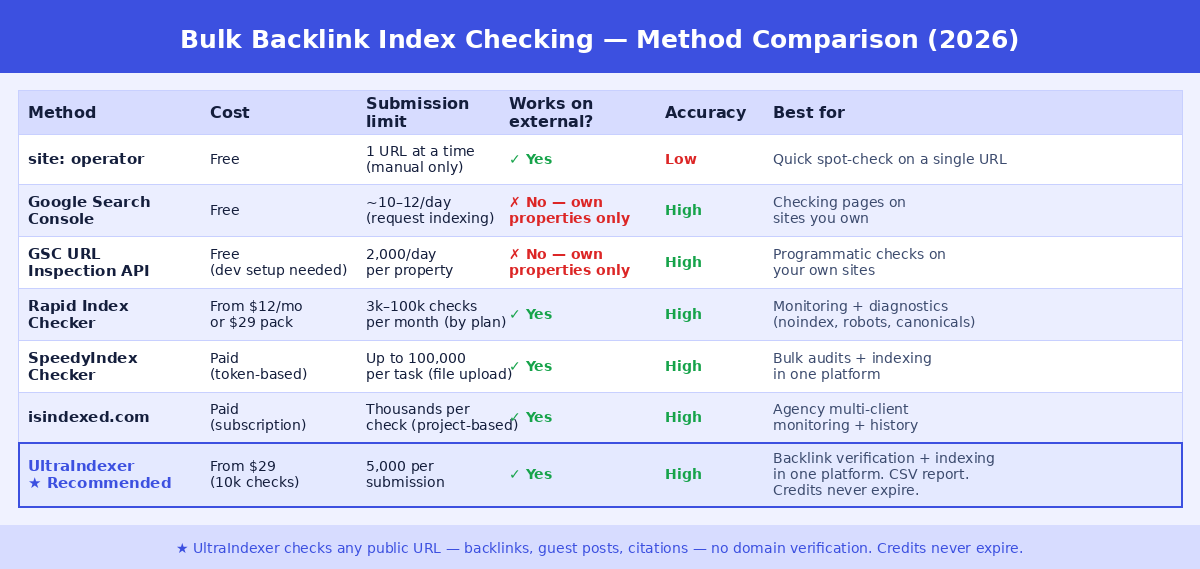
Several tools offer bulk index checking for backlinks. Here's an honest comparison of the main options:
Rapid Index Checker
Rapid Index Checker launched in early 2026 as a subscription-based bulk index checker. Plans range from a free tier with 150 checks per month up to a Business plan with 100,000 checks per month. It also sells one-time credit packs (5,000 credits for $29) for teams with variable volume. Beyond checking, it includes indexability diagnostics — flagging noindex tags, robots.txt blocks, redirect chains, and canonical conflicts — and supports scheduled monitoring with email alerts and webhooks. Best suited for technical SEO teams who need ongoing monitoring alongside one-off bulk checks.
SpeedyIndex
SpeedyIndex is primarily known as a link indexing service but includes a bulk Google index checker that accepts up to 100,000 URLs per task via file upload. Its key differentiator is the same-platform integration: check which links aren't indexed, then immediately submit them to the indexing accelerator without switching tools. Pricing for the checker is token-based and bundled with the broader SpeedyIndex platform.
isindexed.com
isindexed.com is a project-based monitoring tool that processes thousands of URLs per check and stores full indexing history per URL — useful for catching deindexation events before they affect rankings. It's subscription-based and aimed at agencies managing multiple client campaigns who need historical trend data rather than one-off bulk checks.
UltraIndexer — Recommended for backlink verification + indexing
UltraIndexer's Index Checking product checks up to 5,000 URLs per submission and up to 250,000 URLs per order, working on any public URL regardless of whether you own the domain. Each URL is checked against Google's live index and returns an unambiguous indexed or not-indexed result. Results are delivered in a per-URL report downloadable as CSV, available for 14 days.
Where UltraIndexer stands out from standalone checking tools is the combination of checking and indexing in one platform. If your bulk check reveals that 200 of your 500 backlinks aren't indexed, you can submit those 200 directly for indexing through UltraIndexer's dual-phase indexing engine — without switching tools, exporting data, or managing two separate credit systems. Checking credits and indexing credits are separate pools, both of which never expire.
Pricing starts from $29 for 10,000 checking credits. Credits never expire, so there's no pressure to use them within a billing cycle.
How to run a bulk backlink index check with UltraIndexer
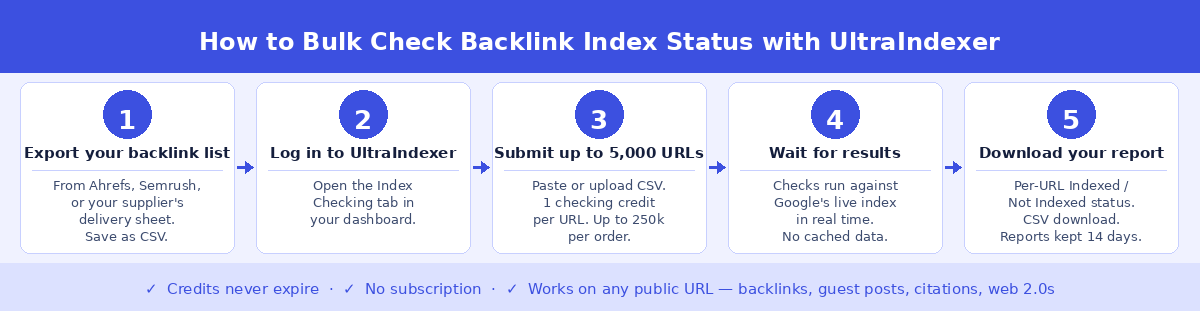
The process takes around five minutes once your URL list is ready:
Step 1 — Export your backlink list. Pull your URL list from wherever your links are tracked. If you use Ahrefs or Semrush, export the referring pages report. If you've received a link delivery from a supplier or agency, use their delivery sheet. If you're running a site migration or content audit, export your internal URLs from Screaming Frog or your CMS. Save as CSV or as a plain text file with one URL per line.
Step 2 — Log in to UltraIndexer and open the Index Checking tab. From your dashboard, click the Index Checking tab. Your current checking credit balance is shown at the top. Each URL you check costs one checking credit.
Step 3 — Submit your URLs. Paste your URL list directly or upload your CSV file. Each submission accepts up to 5,000 URLs. For larger lists, split into multiple submissions — your order can include up to 250,000 URLs total.
Step 4 — Wait for results. Checks run against Google's live index in real time. Results typically appear within minutes for standard submission sizes. You can monitor progress from the My Checks section of your dashboard.
Step 5 — Download your report. Each URL in your submission returns an Indexed or Not Indexed result. Download the full CSV report. Reports remain available for 14 days. The CSV includes the URL, status, and timestamp — ready to share with a client or use as the input for an indexing submission.
When to run a bulk index check
Bulk index checking isn't a one-time exercise. The five situations where it's most valuable:
Before paying a supplier for link delivery. Most link building suppliers deliver a spreadsheet of live URLs and consider the work complete. Index status isn't their responsibility unless you make it one. Check before you pay for more, especially before scaling volume or spend.
After a link building campaign completes. Before reporting results to a client, verify that the links you're reporting are actually indexed. An indexed link count is a more meaningful metric than a delivered link count.
When rankings are underperforming relative to link volume. If you've built substantial link volume but rankings haven't moved as expected, a bulk index check is one of the first diagnostics to run. It's common to find that a large proportion of links from a particular campaign or supplier have never been indexed.
Before starting a new link building campaign. Check the index status of your existing link profile before building more links. If a significant portion of your existing links are unindexed, building more links to a site with those same link types may produce diminishing returns. Fix the indexation problem first.
Regular monthly audits for agency clients. Indexed links can drop out of Google's index over time — the linking page is updated and the link removed, the domain changes, or the page loses crawl priority. A monthly bulk check across active client link profiles catches deindexation before it damages rankings.
What to do when backlinks aren't indexed
A not-indexed result on a backlink doesn't always mean the link is worthless — but it does mean it's currently contributing nothing to your rankings. The right response depends on the link type and why it's not indexed.
For high-value links like editorial guest posts and niche placements, it's worth investigating. Check whether the linking page itself is indexed using the site: operator or a bulk checker. If the page is indexed but your link isn't — which is uncommon but possible — the link may be in a section of the page Google isn't crawling fully, or may have a nofollow or noindex attribute worth examining.
For volume link types — citations, web 2.0s, second-tier links — the practical response is submitting the unindexed URLs through a link indexing service rather than investigating each one individually. This is where the combination of checking and indexing in one platform saves significant time: export the not-indexed URLs from your bulk check report and submit them directly for indexing.
Accept that some proportion of links will never index. Low-authority pages with thin content, links buried deep in paginated archives, and links on pages that Google has assessed as low-value are unlikely to index regardless of how many indexing signals you send. The Linkody data suggests around 16% of links overall never index — for lower-quality link types, that proportion is higher. This is normal and should be factored into campaign planning rather than treated as a failure.
Frequently asked questions
How long does it take for a backlink to get indexed after it's placed?
It varies significantly by the authority and crawl frequency of the linking domain. Backlinks on high-authority, frequently crawled sites — major news outlets, established industry publications — are often indexed within 24–72 hours. Backlinks on smaller, lower-authority sites can take weeks or may never be indexed at all without intervention. Running a bulk check 7–14 days after link placement gives a realistic picture of where your link profile stands.
Does checking backlink index status cost anything?
Free methods like the site: operator cost nothing but don't scale beyond a handful of URLs and aren't fully reliable. Dedicated bulk index checkers charge per URL checked, typically through a credit system. UltraIndexer's checking credits start from $29 for 10,000 checks — at $0.0029 per check, the cost of checking a full 500-link campaign is under $1.50.
Can Google Search Console check my backlinks?
No. Google Search Console only works on properties you own and have verified. Backlinks on third-party domains — the vast majority of your link profile — cannot be checked through GSC. You need a tool that works on any public URL.
Is a not-indexed backlink completely useless?
From a rankings perspective, yes — Google can only count backlinks it has indexed toward your site's authority. A live, working link on a live page that Google hasn't indexed passes no ranking signal. It may eventually get indexed as Google's crawl reaches that page, or it may never be indexed if the page doesn't have sufficient crawl priority.
How often should I check my backlink index status?
For active link building campaigns, check approximately 7–14 days after link delivery to verify initial indexation. For ongoing maintenance of an existing link profile, a monthly check is sufficient for most sites. If you're running aggressive link building campaigns across multiple clients, a weekly check may be warranted to catch deindexation quickly.
Can I check competitor backlinks with a bulk index checker?
Yes. A bulk index checker works on any public URL regardless of who owns the domain. Export a competitor's link profile from Ahrefs or Semrush and run it through a bulk checker to see what proportion of their links are indexed — this can be a useful input when benchmarking your own link building targets.
What is the difference between a page being crawled and being indexed?
Crawled means Googlebot has visited the page and read its content. Indexed means Google has added the page to its search index and it can appear in search results. A page can be crawled without being indexed — Google crawls millions of pages that it decides not to include in its index due to quality signals, duplicate content, or crawl budget decisions. For backlinks, only indexed pages pass ranking value.
Why does the site: operator sometimes show a page as indexed when a bulk checker says it's not?
Both tools have limitations. The site: operator shows a subset of Google's index, so pages can appear in site: results even when they're in a borderline indexing state. Conversely, pages can be indexed but not appear in site: results. A dedicated bulk index checker queries Google more directly and is generally more reliable than the site: operator for definitive indexed/not-indexed status.
INDEX CHECKING
Find out which of your backlinks Google has actually indexed
Submit up to 5,000 URLs per check. Get a per-URL indexed or not-indexed result. Download your CSV report. Credits never expire.
Check your backlinks now →From $29 for 10,000 checks. No subscription.