Backlinks Not Getting Indexed? Here's Why and How to Fix It
You've placed the links. The pages are live. But weeks later, your rankings haven't moved — and when you check, most of those backlinks still aren't in Google's index.
If you have the opposite problem — the link is live and possibly indexed by Google, but Ahrefs cannot see it — see our guide to backlinks not showing in Ahrefs.
That confusion often sits inside a wider pattern: why backlink tools disagree and show different backlink counts even when the links themselves are fine. Our pillar guide walks through the full picture.
This is one of the most common and most misdiagnosed problems in link building. And almost every piece of advice written about it misses the fundamental issue: the standard fixes for "pages not indexed" don't apply when the problem is backlinks on someone else's website.
You can't access Google Search Console for a third-party domain. You can't improve the linking page's content. You can't fix their crawl budget. The diagnosis framework is completely different — and the fixes available to you are a much shorter list than most guides suggest.
This guide covers exactly that. Nine real causes of backlink non-indexation, clearly separated by what you can influence and what you can't, with a practical triage workflow and specific actions for each scenario.
Why backlink indexing is different from page indexing
Most content about indexing problems is written for site owners diagnosing their own pages. That advice doesn't translate to backlinks because the situation is fundamentally different.
When it's your own page that isn't indexing, you have full access to Google Search Console, you can read the exact error message, you can fix the noindex tag, improve the content, add internal links, and request re-indexing. You have complete control.
When it's a backlink on someone else's domain, you have none of that. You can't open their GSC. You can't see why Google is or isn't crawling the linking page. You can't edit their robots.txt or improve their page quality. Your diagnostic tools are limited to external checks, and your fixes are indirect at best.
This distinction is why diagnosing unindexed backlinks starts with a different question: is this a problem with the linking page, or is there something structural you can actually influence?
Step 1: Confirm the backlink is actually not indexed
Before diagnosing anything, confirm the problem is real. There are two issues that commonly create false alarms.
Third-party SEO tools are not Google. Ahrefs, Semrush, and Majestic discover backlinks through their own crawlers. A link can appear in Ahrefs and still not be in Google's index. The reverse is also true — a link can be in Google's index and temporarily disappear from Ahrefs reports. Never use a third-party tool as confirmation of Google's index status.
The site: operator is unreliable. Searching site:example.com/page-url in Google shows a subset of indexed pages, not a complete picture. A page can be indexed and not appear in site: results, particularly for lower-authority pages. A blank site: result is a signal, not a definitive answer.
The most reliable free method is to paste the exact URL of the linking page into Google's search bar (not site:, just the full URL). If the page appears as a result, Google has indexed it. This is more reliable than the site: operator for individual URL checks.
For checking at scale — if you're auditing dozens or hundreds of backlinks — use a dedicated bulk index checker that queries Google directly. UltraIndexer's Index Checking product returns a per-URL indexed or not-indexed result for any public URL, with no GSC access required. At $0.0029 per check, auditing 500 backlinks costs under $1.50.
Once you've confirmed which specific links are unindexed, check the timing. How long has it been since the link was placed?
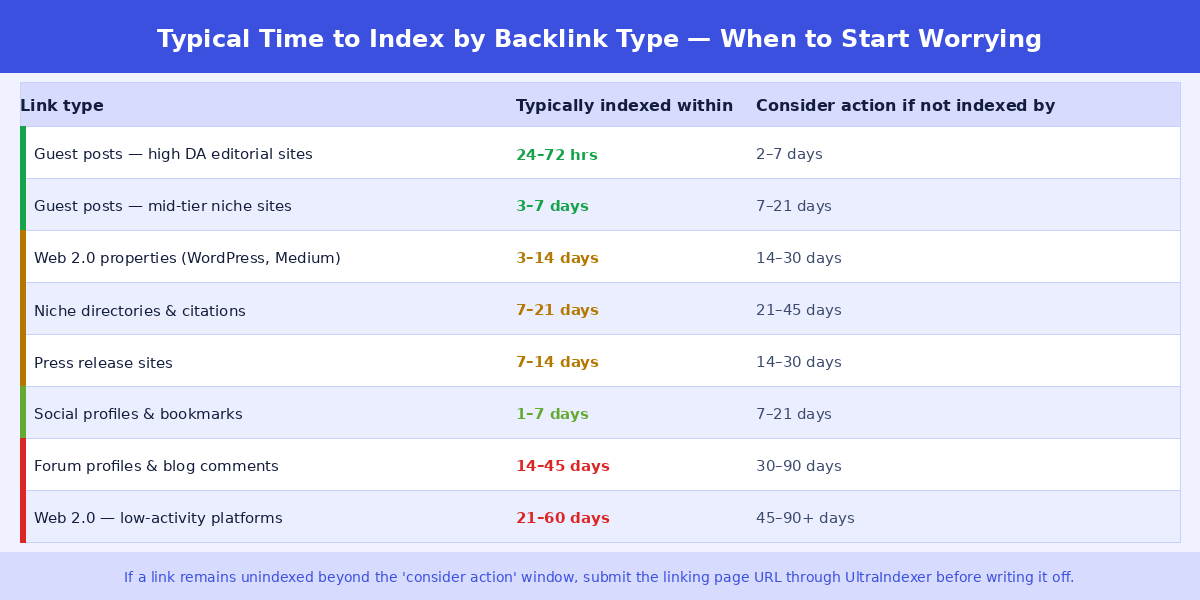
Indexing timelines vary significantly by link type. A backlink on a major editorial site with high traffic and daily Googlebot visits can appear in Google's index within 24 hours of publication. A backlink on a low-traffic web 2.0 property that gets crawled infrequently might take six weeks. Don't treat a 14-day-old backlink on a forum profile as a failure — it may simply be waiting in Google's crawl queue.
The general rule: wait at least 7–14 days after link placement before treating non-indexation as a problem that needs intervention. For lower-authority link types, extend that to 30 days.
The 9 real causes of backlink non-indexation
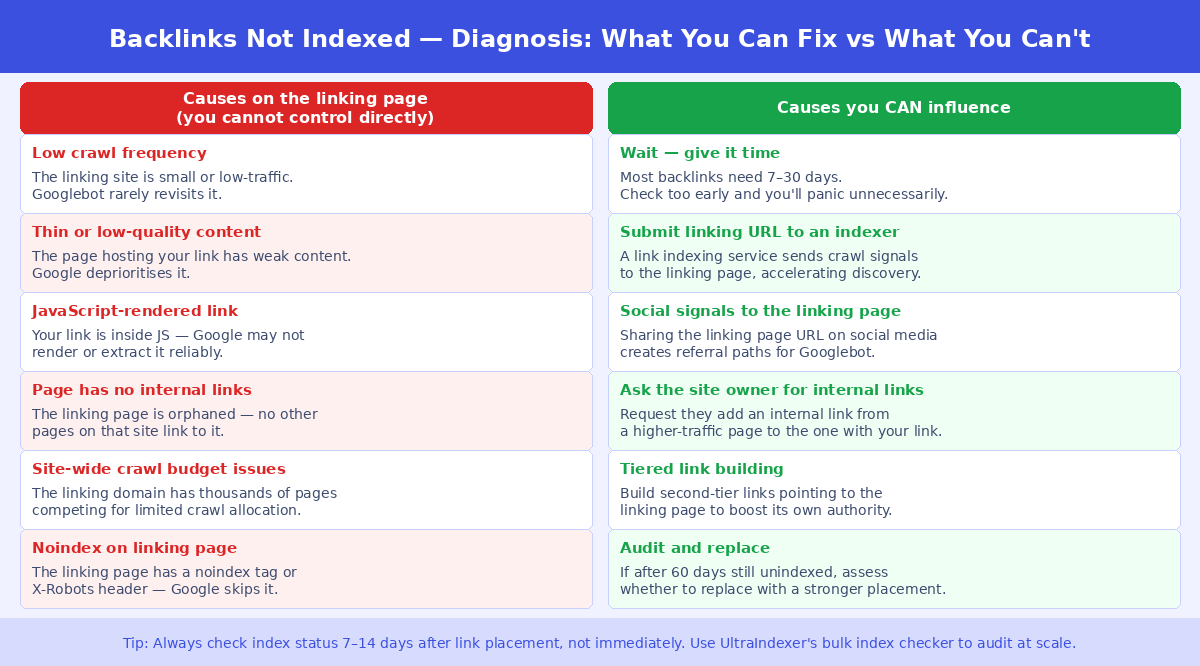
Causes on the linking page you cannot directly control
1. The linking page is crawled infrequently
Every website receives a crawl budget from Google — an allocation of resources that determines how often and how thoroughly Googlebot visits. High-authority sites with strong traffic and frequent content updates get crawled constantly. Smaller, lower-traffic sites might only get meaningful Googlebot attention every few weeks.
A new guest post on a DR25 blog that publishes twice a month and gets 300 organic visits could easily sit uncrawled for three to four weeks after publication. Your link is on the page, but Google hasn't revisited that page since before the post was published.
This is the most common cause of backlink non-indexation and the one that resolves itself most often with time. It's not a failure — it's a function of the linking domain's standing with Google.
2. The linking page has thin or low-quality content
Post-Helpful Content Update, Google is significantly more aggressive about deprioritising pages it considers low-value. A guest post that reads like it was written purely for the link, with minimal original insight and high generic content density, may get crawled and then deliberately excluded from the index.
"Crawled — currently not indexed" is the GSC status for this scenario, though you'll only see it if the site owner checks their own GSC. From the outside, you'll see it as a page that returns 200 but doesn't appear in Google's index.
The practical implication: the quality of the page hosting your backlink directly affects whether that link ever indexes. Placements on thin, content-farm-style pages are structurally more likely to fail indexation regardless of what you do.
3. Your link is rendered in JavaScript
Google does process JavaScript, but it's slower and less reliable than reading clean HTML. If your link is inside a JavaScript component — a dynamically loaded widget, a comment section powered by JS, a tab that only renders on click — Googlebot may crawl the page and fail to extract your link from it entirely.
This is more common than most link builders realise, particularly on modern sites using React, Vue, or Angular frameworks where links inside components may not appear in the initial HTML response.
To check: right-click on the page in your browser, select "View Page Source" (not Inspect — Page Source), and search for your URL. If it's not in the raw HTML, it's in JavaScript and Google may not be processing it.
4. The linking page is orphaned
An orphaned page is one that no other page on the same domain links to. It has no internal link equity flowing to it. For Google, a page with no internal links is a low-priority crawl target — it has to find it through the sitemap or an external link, and even then it may deprioritise it in crawl scheduling.
This is particularly common with guest posts published on sites with poor internal linking practices, or with web 2.0 posts that sit as standalone entries with no cross-linking from the author's other posts on the same platform.
5. Noindex directive on the linking page
A noindex tag or X-Robots-Tag header on the linking page explicitly tells Google not to include it in the index. If the site owner has noindexed that page — deliberately or accidentally — your backlink will never index regardless of any action you take.
You can check for a noindex tag by viewing the page source and searching for noindex, or by using a tool like httpstatus.io to check the response headers. If you find a noindex directive on a page you paid for as a placement, this is grounds to request a replacement from the link building supplier.
6. Robots.txt blocking Googlebot from the page
If the site's robots.txt file disallows crawling of the page or the directory it's in, Googlebot won't visit it. Unlike noindex (where Google crawls but excludes), a robots.txt block prevents Google from reaching the page at all.
Check by visiting example.com/robots.txt and looking for Disallow rules that match the URL pattern of the linking page. You can also use Google's Robots.txt Tester via GSC if you have access — but for a third-party domain, the manual check is your only option.
Causes you can actively influence
7. No external signals pointing to the linking page
Google's crawl prioritisation is partly driven by how many other pages link to a given URL. A new guest post with no external signals pointing at it — no links from other sites, no social shares, no referral traffic — is a low-priority crawl target. It may sit in Google's "discovered" queue for weeks before being visited.
This is the cause most directly within your control, and it's the foundation of tiered link building: building signals that point to the page hosting your backlink, not just to your own domain.
8. Insufficient time has passed
This sounds obvious, but it's genuinely the most common "problem" that turns out not to be one. Many link builders check indexation 3–5 days after link placement, find nothing, and conclude the link has failed. For most link types, this is simply too early.
The timeline graphic above shows realistic windows by link type. For web 2.0 properties, forum profiles, and lower-authority placements, 30 days is a reasonable minimum before treating non-indexation as a genuine problem.
9. The linking domain has a history of quality issues
Some domains have accumulated a history that causes Google to deprioritise or distrust their content. This could be previous spam, a manual action (even if later revoked), a pattern of thin content, or an unusual ratio of outbound to inbound links. Links from these domains may crawl inconsistently even when the specific page hosting your link is fine.
This is a signal about supplier quality rather than a fixable technical issue. If you're consistently seeing low indexation rates from a particular site or link building source, the domain's history may be the cause.
What you can actually do about it
Now that you've identified which cause applies, here are the specific actions available to you — with clear notes on what these actions can and can't accomplish.
Submit the linking page URL to a link indexing service
A link indexing service works by sending crawl signals — pings to various indexing APIs, references from high-authority properties, and other crawl triggers — to the URL of the linking page. The goal is to create enough external signal activity that Googlebot prioritises visiting that specific page sooner than it otherwise would.
This addresses causes 1 (infrequent crawl), 4 (orphaned page), and 7 (no external signals). It doesn't fix noindex tags, robots.txt blocks, or JavaScript rendering issues.
When submitting to an indexing service, submit the URL of the page that contains your backlink — not your own site's URL. The indexing signals need to point at the linking page, not at the destination of your link.
UltraIndexer's dual-phase indexing service handles this workflow with 1–31 day drip feed scheduling and a 7-day per-URL verified report. You can read about the full indexing methodology in our guide: How to Index Backlinks Fast: The Complete 2026 Guide.
Create social signals pointing to the linking page
Sharing the linking page URL on Twitter/X, LinkedIn, Reddit, and other high-authority platforms creates referral paths that Googlebot follows. These signals serve two purposes: they give Googlebot an external crawl path to the linking page, and they generate referral traffic signals that indicate the page has real-world relevance.
This is most effective for guest posts on legitimate sites where social sharing looks natural. For web 2.0 posts or directory listings, the impact is smaller but still worth doing. Share from genuine accounts, not from accounts that exist only to generate social signals.
Request internal links from the site owner
If you have a direct relationship with the site owner or blogger who published your guest post, ask them to add an internal link to the post from an existing, well-trafficked page on their site. Even one internal link from a page that gets regular crawls can dramatically accelerate indexation of an orphaned post.
This isn't always possible — many link building relationships are transactional and don't include ongoing communication. But for higher-value placements where you have a direct relationship, it's worth asking.
Build second-tier links to the linking page
Second-tier link building means creating links that point to the page hosting your backlink, rather than to your own domain. These links improve the linking page's authority signals, make it a higher-priority crawl target, and in some cases push it to index faster.
Common second-tier sources: web 2.0 posts, social bookmarks, RSS submissions, and forum profile links pointing at the linking page URL. The links don't need to be high authority — their purpose is to create crawl signals and authority flow to the linking page, not to rank it in search results.
Check and replace technical blockers
If your check reveals a noindex tag or robots.txt block on the linking page, you have two options: contact the site owner to request the blocker is removed, or treat the placement as a failed delivery and request a replacement.
For paid link placements, a noindex tag or robots.txt block is a legitimate basis for requesting a replacement or refund. The link was sold as an indexed placement; if the page is technically excluded from Google's index, it doesn't deliver what was agreed.
Wait and re-check systematically
For links that are within their normal indexation window, the right action is often nothing — just wait. Set a calendar reminder to re-check at the appropriate interval for the link type (see the timeline graphic above). Use a bulk index checker to run the re-check efficiently rather than doing it manually URL by URL.
The UltraIndexer Index Checking product is built for this workflow: export your backlink list, submit to the checker at 14 days, 30 days, and 60 days, and only escalate to intervention for links that remain unindexed beyond their expected window.
When to give up on a backlink
Not every unindexed backlink can be fixed, and pursuing them all indefinitely is not a good use of time. There's a pragmatic point at which it's better to write off a link than to keep trying to index it.
The signals that suggest a link isn't worth pursuing further:
- The linking page has a noindex tag and the site owner won't remove it
- The linking page has been deleted or returns a 404
- The link is still unindexed after 90 days despite submission to an indexing service and social signals
- The linking domain has lost significant authority or been penalised since you acquired the link
- The link is in a section of the page (footer, sidebar, heavily templated area) that Google consistently ignores
For links in these categories, the effort of continued indexation attempts outweighs the likely payoff. Document them, remove them from active campaign reporting, and factor the failure rate into your supplier assessments and campaign planning going forward.
How to systematise backlink indexation checks
Running ad-hoc checks on individual links doesn't scale. Here's a practical workflow for agencies and serious link builders managing links at volume:
Day 0 (link placement): Log the linking page URL, the placement date, and the link type in your tracking sheet. Set your first check date based on link type — 14 days for guest posts, 30 days for web 2.0s and directories.
First check: Run a bulk index check on all links due for first review. Export the not-indexed URLs. Submit them to an indexing service immediately. For any pages with confirmed noindex or robots.txt blocks, flag for replacement request.
Second check (30–45 days): Re-check the links that were not indexed at first check. If still not indexed after submission to an indexing service, apply social signals and consider second-tier links for higher-value placements.
Final check (60–90 days): Any link still unindexed at this stage should be assessed for write-off or escalation. Document the outcome and update your supplier scoring accordingly.
This workflow gives every link a fair window while preventing the common mistake of either checking too early (and panicking unnecessarily) or never checking at all (and reporting indexed link counts that include links doing nothing for your rankings).
Frequently asked questions
Can I force Google to index a backlink?
No. You can improve the conditions that make indexation more likely — crawl signals, social traffic, internal links — but Google makes the final decision on every URL. Any service claiming to guarantee indexation of specific URLs is overstating what's possible. What indexing services legitimately do is increase the probability and speed of indexation by generating crawl signals; they don't override Google's quality judgements.
Why does a backlink show in an SEO tool but not in Google's index?
Third-party backlink tools run their own crawlers, separate from Google's. Each has its own crawl schedule, priorities, and database, so a link appearing in any of them says nothing about Google's index status. Ahrefs is the most common example, and our guide to backlinks not showing in Ahrefs covers that case in detail. Whichever tool you use, verify against Google directly with a bulk index checker.
How long should I wait before submitting an unindexed backlink to an indexing service?
For guest posts on mid-to-high authority sites, waiting 7–14 days before submitting is reasonable — many will index naturally within that window. For web 2.0 posts, forum profiles, and lower-authority link types, you can submit immediately since natural indexation for these link types is slow and less certain. There's no downside to early submission for lower-authority link types.
Does a nofollow backlink need to be indexed?
Yes, for the link to pass any signals — even the indirect signals that nofollow links can pass — the page hosting it needs to be indexed. Google's treatment of nofollow has evolved: they're now treated as hints rather than strict directives, which means some nofollow links do pass signals. But that only applies if the page is indexed in the first place.
What's the difference between "Discovered — currently not indexed" and "Crawled — currently not indexed"?
These are Google Search Console statuses visible to the site owner of the linking domain. "Discovered" means Google knows the URL exists (from a sitemap or link) but hasn't crawled it yet — it's in the queue. "Crawled — currently not indexed" means Google visited the page, read its content, and made a decision not to include it in the index — typically due to a quality judgement. The second status is more serious and harder to resolve because it requires improving the page's content quality, not just creating crawl signals.
I submitted the linking page to an indexing service two weeks ago and it's still not indexed. What now?
Two weeks after submission is still within a normal window for lower-authority pages. Check whether the page has a noindex tag or robots.txt block (this would explain persistent non-indexation despite indexing signals). If no technical blockers, add social signals pointing to the linking page URL and wait until the 45-day mark before re-evaluating. If still not indexed at 60 days with no technical blockers identified, it's likely a quality judgement by Google — the page's content or the domain's overall quality is the cause, and further indexing attempts are unlikely to succeed.
Should I disavow backlinks that aren't indexed?
No. An unindexed backlink isn't passing any signals to your site — positive or negative. You can't receive a penalty from a backlink Google hasn't processed. Disavow is a tool for links that are indexed, have been processed, and are causing harm. An unindexed link doesn't need to be disavowed; it's already invisible to Google. For why that link passes nothing until Google stores it, see what link indexing actually is.
INDEX CHECKING + INDEXING
Find out which backlinks are indexed — then fix the ones that aren't
Bulk check up to 5,000 URLs at once. Get a per-URL indexed or not-indexed result. Submit unindexed links directly for indexing — all in one platform.
Checking from $29 · Indexing from $9 · Credits never expire · No subscription