Backlinks Not Showing in Ahrefs? Causes and Fixes
You built the link. You can open the page and see it with your own eyes. But your backlinks are not showing up in Ahrefs — and now you are wondering whether the link even counts.
Here is the short answer: a backlink missing from Ahrefs is usually a reporting gap, not a lost link. Ahrefs runs its own crawler with its own priorities, and it sees a different slice of the web than Google does. This guide covers why Ahrefs misses links, how to diagnose each cause, and how to confirm what actually matters — whether Google has indexed the link.
This is one case of a wider pattern — every backlink tool reports different numbers, and our guide to why backlink tools show different numbers explains the full picture.
One important distinction before we start. If your problem is the reverse — the link shows in Ahrefs but Google has not indexed it — that is a different issue with different fixes. We cover it in backlinks not getting indexed. This post is about links that exist but that Ahrefs cannot see.
How Ahrefs finds backlinks in the first place
Ahrefs does not receive a notification when you build a link. It discovers links the same way a search engine does: its crawler, AhrefsBot, visits pages, reads the HTML, and records the links it finds.
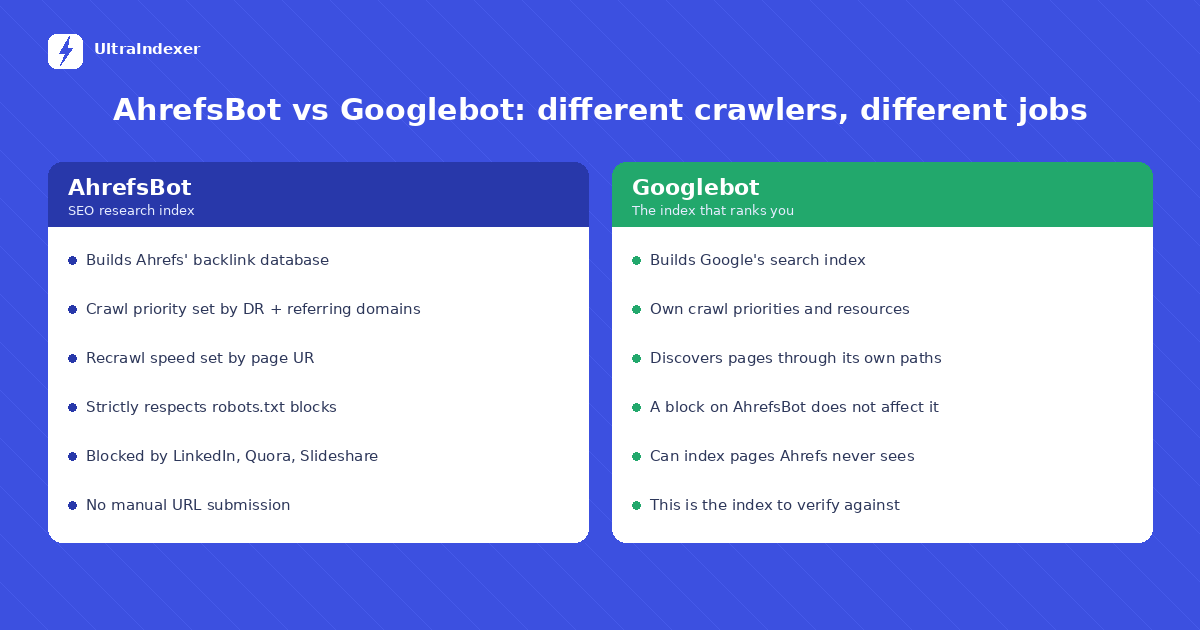
According to Ahrefs's own documentation, two things decide how quickly that happens. Crawl priority depends on how "popular" a site is — a higher Domain Rating (DR) and more quality referring domains mean more frequent crawling. Update speed depends on the page's URL Rating (UR) — high-UR pages are recrawled more often than low-UR pages.
That design has a direct consequence for link builders. Backlinks tend to live on exactly the kinds of pages that get crawled least: new blog posts on small sites, deep inner pages, directory entries, and tier-2 properties. The link is real. AhrefsBot simply has not been there yet — or will not go there often.
7 reasons your backlinks are not showing up in Ahrefs
1. AhrefsBot has not crawled the linking page yet
This is the most common cause and the least serious. If your backlinks are not showing up in Ahrefs after only a few days, crawl lag is the first thing to suspect. Ahrefs revisits pages on a priority schedule, not in real time. A link on a high-DR news site can appear within days. A link on a low-DR blog with few referring domains can take weeks — sometimes longer.
If the linking page is new, low-authority, or buried deep in a site with weak internal linking, patience is usually the correct response. There is no way to manually submit a URL to Ahrefs's index, so waiting is often the only option on the Ahrefs side.
2. The linking site blocks AhrefsBot in robots.txt
Ahrefs states that AhrefsBot strictly respects robots.txt, including both disallow and allow rules. Many site owners block SEO crawlers deliberately — to save server resources, or to keep their link profile out of competitor research tools.
If the site hosting your backlink has a rule like User-agent: AhrefsBot followed by Disallow: /, that link will never appear in your report, no matter how long you wait. You can check any domain in Ahrefs's own robots checker at ahrefs.com/robot. Googlebot may still crawl the page normally — a block on AhrefsBot says nothing about Google.
3. A firewall or CDN is blocking the crawler
Some blocks are not in robots.txt at all. Ahrefs documents that firewalls, hosting-level protection, and CDN security tools — including ModSecurity, Sucuri, and Cloudflare configurations — can block AhrefsBot at the server level. The site owner may not even know it is happening.
The symptom looks identical to a robots.txt block: the link never appears. The difference is that the robots checker shows crawling as allowed, yet the site still returns no data in Ahrefs.
4. The link is rendered by JavaScript
Modern sites built on frameworks like React or Vue often inject links after the page loads. If your backlink does not exist in the raw HTML source, third-party crawlers can miss it, even when the link is perfectly visible in a browser.
The test takes ten seconds. Open the linking page, view the page source (Ctrl+U), and search for your domain. If it is not in the source, do not expect it in Ahrefs any time soon.
5. Noindex tags, canonicals, or redirect chains on the linking page
A noindex tag tells crawlers a page is not meant to carry SEO value, and links from persistently noindexed pages are typically excluded from backlink reports. A canonical tag pointing to a different URL can cause the link to be attributed to another page — or dropped. Long redirect chains can cause a crawler to give up before it reaches the final destination.
These causes matter more than the others on this list, because they can affect how Google treats the link too, not just how Ahrefs reports it.
6. The platform restricts crawlers entirely
Ahrefs openly documents that links from LinkedIn, Quora, and Slideshare do not appear in its backlinks report, because those platforms block AhrefsBot through robots.txt. Links inside PDF files are affected as well. If your link lives on one of these platforms, its absence from Ahrefs is expected behavior — not a problem to fix.
7. Your own Ahrefs filters are hiding it
Sometimes the link is in the database and your report settings are hiding it. A "dofollow only" filter hides nofollow, sponsored, and UGC links. The "Live" mode hides links Ahrefs has recently seen removed. When backlinks are not showing in Ahrefs reports, reset filters and check the "All" or historical views before diagnosing a crawling problem. Many "missing" links were simply filtered out.
How to diagnose a missing backlink in 5 steps
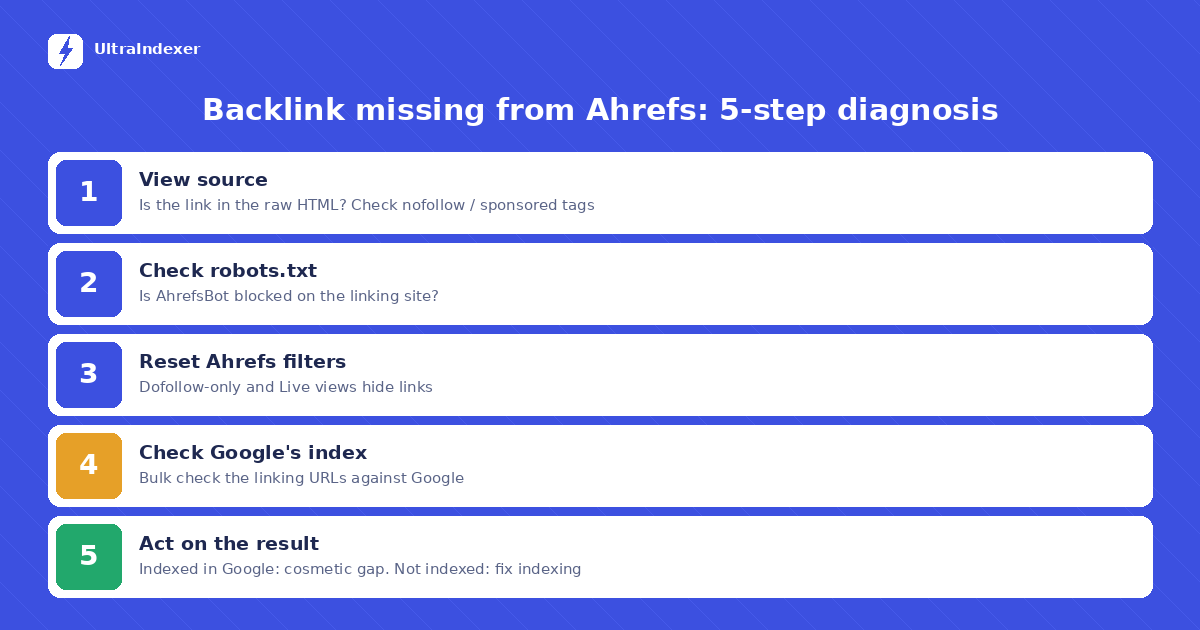
When a backlink is not showing up in Ahrefs, work through these steps in order. Each one rules out one layer of the problem.
Step 1 — Confirm the link exists in the HTML. Open the linking page in a private window, view source, and search for your domain. Check whether the link is a standard anchor tag and whether it carries nofollow, sponsored, or UGC attributes.
Step 2 — Check robots.txt. Visit the linking site's /robots.txt and look for rules targeting AhrefsBot or all user agents. Confirm with Ahrefs's robots checker.
Step 3 — Check your Ahrefs filters. Switch off "dofollow only," check historical views, and look at the Lost links report. Rule out a reporting filter before assuming a crawl failure.
Step 4 — Check whether Google has indexed the linking page. This is the step that actually matters. Use the methods in our guide to checking if a URL is indexed by Google. For a full campaign audit, run the linking URLs through a bulk index checker instead.
Step 5 — Act on what you find. If Google has indexed the page, the link is doing its job and the Ahrefs gap is cosmetic. If Google has not indexed it either, you have a real indexing problem — the fixes are in our guide to backlinks not getting indexed.
Does a backlink missing from Ahrefs hurt your SEO?
No — not by itself. Ahrefs is a measurement tool, not the index that ranks you. Google maintains its own index, discovers pages through its own crawler, and evaluates links based on what Googlebot sees. A link can be fully indexed by Google and absent from Ahrefs, and the reverse is also true.
What can hurt your SEO is drawing the wrong conclusion from the gap. Two mistakes are common. The first is writing off a good link — or demanding a refund from a link vendor — because a third-party tool has not caught up. The second is the opposite: assuming a link counts because it appears in Ahrefs, when Google has never indexed the page it sits on.
The fix for both is the same habit: verify against Google, not against a third-party database. For one or two links, a manual check is fine. For a campaign of hundreds, bulk checking directly against Google's index gives you a per-URL answer in one pass. It tells you which links need indexing help — not which links one tool happens to have crawled. Our bulk checking guide walks through the full workflow.
What "Page is not currently in our index" means
If you paste a URL into Ahrefs Site Explorer and see "Page is not currently in our index," Ahrefs's documentation is clear about the meaning: AhrefsBot has not visited that page. The message used to read "Not visited by AhrefsBot yet" before Ahrefs renamed it.
The same applies when the Overview report shows zero crawled pages for a site. It means the site is not in Ahrefs's index — because it is new, low-priority, or blocking the crawler. It does not mean the site is missing from Google. A brand-new site can be indexed and ranking in Google while still showing nothing in Ahrefs. Again: two different crawlers, two different indexes, two different jobs.
Frequently asked questions
Why is my backlink not showing in Ahrefs?
The most common reasons are crawl delay on a low-priority page, a robots.txt or firewall block on AhrefsBot, JavaScript-rendered links, noindex or canonical tags on the linking page, platform-level crawler restrictions, or a report filter hiding the link. Work through the five-step diagnosis above to find which one applies.
Does Ahrefs show all backlinks?
No tool shows all backlinks. Ahrefs sees the portion of the web its crawler can access, and Ahrefs itself documents categories of links it cannot report — including links on sites that block AhrefsBot and links on platforms like LinkedIn, Quora, and Slideshare.
How long does it take for Ahrefs to find a new backlink?
It varies with the linking site's crawl priority. Links on high-authority, frequently updated sites can appear within days. Links on small or new sites can take weeks or longer, and there is no fixed timeline. Ahrefs does not accept manual URL submissions to speed this up.
Can a link be indexed by Google but missing from Ahrefs?
Yes, and it happens regularly. Googlebot and AhrefsBot crawl independently, with different resources and different access. A site can allow Googlebot while blocking AhrefsBot entirely. That is why index status should always be verified against Google directly.
Should I worry if Ahrefs shows zero crawled pages for my site?
Not immediately. Per Ahrefs's documentation, it means AhrefsBot has not indexed your pages yet — common for new sites — or that something is blocking the crawler. Check your robots.txt and any firewall or CDN rules if you want Ahrefs data. Your Google indexing and rankings are unaffected either way.
Why are my YouTube, social media, or Crunchbase backlinks not showing in Ahrefs?
Large platforms are the most common gap. Many block AhrefsBot in robots.txt, render links with JavaScript, or mark them nofollow — YouTube, LinkedIn, Quora, and profile sites like Crunchbase all fall into this group. Their absence from Ahrefs is expected behavior, not a lost link. Verify against Google directly instead.
Why does Ahrefs show my backlinks as lost?
A "lost" link means AhrefsBot revisited the page and could not find the link it saw before — removed, redirected, noindexed, or the page was unreachable at crawl time. Unreachable pages sometimes come back, so recheck later and confirm on the live page before treating the link as gone.
What does "URL is out of scope" mean in Ahrefs?
It means the URL you entered falls outside the target scope selected in Site Explorer — for example, a full URL while in domain mode, or a different protocol or subdomain than the target. Re-run the check in exact URL mode or adjust the target scope to match.
Do other tools like Moz or Semrush miss backlinks too?
Yes. Every third-party backlink tool runs its own crawler with its own coverage, priorities, and blocks — so each shows a different slice of the web, and every one of them differs from Google's index. The diagnosis steps in this guide apply to any of them: confirm the link in the HTML, then verify against Google.
Verify against the index that pays you
Ahrefs is a genuinely useful tool for link research — but it is a map of the web, not the territory. When a backlink goes missing from a report, the question that decides whether you act is never "does Ahrefs see it?" It is "does Google have it indexed?"
UltraIndexer's bulk index checker answers that question directly against Google, up to 5,000 URLs per check, with a per-URL status report. If the check turns up links Google has not indexed, submit them for indexing and recheck. See checking plans — credits never expire.