Best Backlink Indexing Tools in 2026: 9 Indexers Compared
A backlink that Google hasn't indexed is worth nothing. It passes no authority, sends no ranking signals, and generates no return on the time and money spent acquiring it. This is why backlink indexing services exist — and why choosing the right one matters.
The market has changed significantly in 2026. Several tools have moved to subscription models with monthly credit resets. A new generation of pay-per-result services has emerged. Older tools using outdated ping-based methods have declining success rates as Google's crawlers have become more sophisticated at ignoring artificial signals.
This guide covers nine tools — eight paid indexers and one free option — with verified pricing from each tool's official website as of September 2026. Every claim about features and pricing is sourced from the tool's own pages or documented user tests. No inflated success rate claims, no affiliate-driven rankings.
What to look for in the best backlink indexing tool
Before comparing individual tools, it's worth being clear about what actually matters when choosing an indexing service — and what doesn't.
Pricing model: Pay-as-you-go vs subscription is the most consequential decision. Subscription models with monthly credit resets mean unused credits are lost at the end of each billing cycle. For link building campaigns with variable volume, pay-as-you-go with non-expiring credits is almost always more economical.
Refund policy for unindexed links: The best services refund credits automatically for links that don't index within the report window. This matters both as a cost control mechanism and as a transparency signal — a service confident in its results is willing to refund failures.
Report delivery time and quality: A 7-day report tells you much sooner whether links have indexed than a 14-day report. Per-URL status (indexed or not indexed for each submitted URL) is more useful than an aggregate success rate.
Drip feed scheduling: Submitting thousands of links in a single burst looks unnatural. Drip feed — spreading submissions over 1–30 days — creates a more natural crawl pattern. Not all indexers offer this.
No GSC access required: You cannot use Google Search Console to index backlinks on third-party domains. Any indexer that claims to use GSC submission for your backlinks (rather than for pages on your own sites) is either accessing other people's GSC accounts (a ToS violation) or describing something else entirely.
Methods used: Services using RSS mass pinging, directory blasting, and other spam-signal methods have declining effectiveness as Google's systems have become better at ignoring them. Indexers that create genuine crawl pathways — through authoritative feed injection and direct crawl signalling — perform better in 2026.
The best indexing tool for your situation depends less on any single feature than on how those six factors line up with your volume and link types — which is what the comparison below is built around.
The 9 tools compared
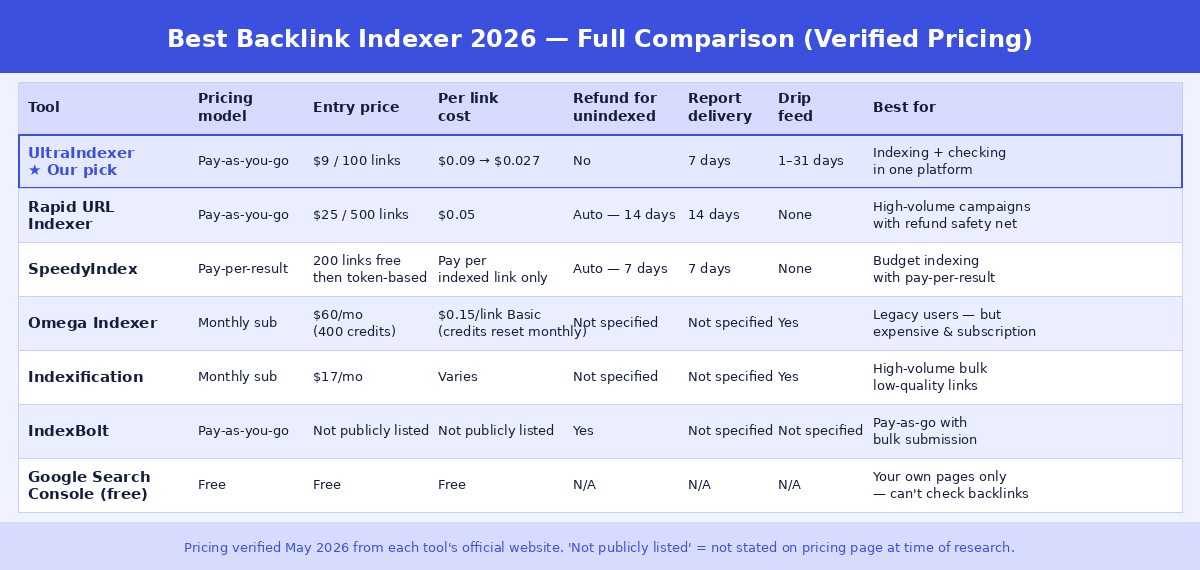
1. UltraIndexer — Best for indexing + checking in one platform
Pricing: Pay-as-you-go. Trial: $9 for 100 links ($0.090/link). Starter: $19 for 500 links ($0.038/link). Basic: $34 for 1,000 links ($0.034/link). Growth: $159 for 5,000 links ($0.032/link). Pro: $299 for 10,000 links ($0.030/link). Agency: $1,349 for 50,000 links ($0.027/link). Credits never expire.
What it does: UltraIndexer runs a dual-phase AI-powered indexing process for each submitted URL, with 1–30 day drip feed scheduling and a verified 7-day per-URL report showing indexed or not-indexed status for each backlink. No Google Search Console access required — it works on any public URL, including backlinks on third-party domains.
Index checking included: Uniquely among the tools in this roundup, UltraIndexer combines backlink indexing with a separate Index Checking product in one account. You can bulk-check which of your backlinks are currently indexed (up to 5,000 URLs per batch), identify the unindexed ones, and submit them for indexing — without switching tools or managing separate accounts. Index checking starts from $29 for 10,000 checks ($0.0029/check). See how the free index checkers compare if you only need a standalone checker.
Report: 7-day verified report with per-URL indexed/not-indexed status. Downloadable as CSV.
Drip feed: 1–30 days, configurable per submission.
Best for: SEOs and agencies who want to run both index checking and backlink indexing in one workflow without managing separate tool subscriptions. Particularly strong for agencies delivering link building who need verification reporting for clients.
Limitations: Newer to the market than Rapid URL Indexer. No free tier — the smallest package is $9 for 100 links. No automatic re-credit for unindexed URLs.
2. Rapid URL Indexer — Best refund policy, strong track record
Pricing: Pay-as-you-go. Starts at $25 for 500 credits ($0.05/link). Bulk discounts available at higher volumes. Credits never expire.
What it does: Rapid URL Indexer submits URLs through a multi-layer process including direct API signalling, backlink pings to major crawlers, and social/RSS signal distribution. It publishes an average indexing success rate of 91% across all link types — though independent tests on specific link types (such as press releases) have shown rates of 66–67%, which is more realistic for lower-authority content.
Refund policy: Automatic 100% credit refund for any link not indexed within 14 days. This is the strongest automatic refund policy in the market and is a meaningful differentiator — you genuinely only pay for links that index.
Report: Initial report at 4 days, final report at 14 days. Per-URL status with visual charts.
Drip feed: Not available.
Best for: High-volume campaigns where the automatic refund policy provides meaningful cost protection. Strong choice for agencies who need clean per-URL reporting for client delivery.
Limitations: 14-day report window means you wait longer to know outcomes. No drip feed. No index checking product. No white-label reports.
3. SpeedyIndex review — Pay-per-result with 7-day reporting
Pricing: Token-based. 1 indexed link = 100 tokens. Tokens are only deducted for URLs that are confirmed indexed — unindexed links receive a 100% automatic refund. Token packages start at $5 for 5,000 tokens — about $0.10 per indexed link at entry level. Tokens never expire. Pricing per token varies by package.
What it does: SpeedyIndex claims to dispatch real mobile Googlebot to submitted URLs, without using link wheels, GSA, Xrumer, or other blackhat methods. It operates primarily through a Telegram bot interface. It explicitly states it cannot guarantee indexing outcomes — only crawler interaction — which is an honest and accurate disclaimer.
Refund policy: Automatic 100% refund for unindexed links. You only pay for confirmed indexed results.
Report: 7-day final report. Live progress tracking from day 1.
Drip feed: Available on the pay-per-result plan — spreads delivery across a number of days you choose.
Best for: Budget-conscious SEOs who want a pay-per-result model and 7-day reporting. The $5 starter package makes it easy to test before committing budget.
Limitations: Telegram-based interface is less polished than browser-based tools. No index checking. The low per-link cost reflects the pay-per-result structure — you pay nothing for unindexed links, but the base token cost is lower than tools charging upfront per submission.
4. Omega Indexer — High-cost subscription, declining reputation
Pricing: Monthly subscription only. Basic: $60/month for 400 credits ($0.15/link). Growth: $150/month for 2,000 credits ($0.075/link). Pro: $500/month for 8,000 credits ($0.0625/link). Agency: $2,000/month for 20,000 credits ($0.10/link). Credits reset monthly — unused credits are lost at the end of each billing cycle.
What it does: Omega Indexer uses a combination of Google Search Console submissions, automated pinging, and a proxy network to accelerate indexation. It offers drip feed scheduling and has been a popular choice in the SEO community since its founding in 2019–2020.
The problems: The shift from pay-as-you-go ($0.02/link) to monthly subscriptions starting at $60/month has generated significant community backlash on BlackHatWorld and SEO forums. The monthly credit reset structure means budget is wasted unless you submit consistently every month. Omega holds a 2.7/5 rating on Trustpilot (as of March 2026), with multiple documented concerns about their use of spam domains to create signals pointing at submitted URLs — a method that carries risk as Google's spam detection improves. Omega does not publish success rate data.
Refund policy: Not clearly specified on their official pricing page.
Report: Not clearly specified.
Drip feed: Available.
Best for: Teams who were already using Omega before the pricing model change and have existing campaigns built around it. For new users, the subscription model and per-link cost make it hard to justify versus pay-as-you-go alternatives.
Limitations: Most expensive per-link at lower volumes. Monthly credit reset creates structural waste. No publicly stated success rate or refund guarantee. Community concerns about method safety.
5. Indexification — Legacy ping methods, no index verification
Pricing: Monthly subscription from $17.97/month for up to 1.5 million links. The per-link price is a fraction of a cent, but see below for why that number cannot be used.
What it does: Indexification has run since 2012 and pushes links through six methods: bulk pinging, RSS feed creation, social bookmarking, 301 redirects, XML sitemap submission and stub content pages. We reviewed each one. Google removed its ping endpoint, so bulk pinging does nothing. Artificial RSS feeds and social bookmarks are patterns Google discounts. Redirect chains built to steer crawlers are against its guidelines. Sitemap submission cannot work for URLs you do not own. That leaves stub content pages, whose value depends entirely on domain quality Indexification does not disclose.
The problem: Indexification reports submission and ping activity, not Google index status. There is no per-URL indexed or not-indexed result and no published index rate. So the headline price cannot be turned into a cost per indexed link, because you are never told what indexed. A crawl signal is not an index entry, and here even the crawl is unverified.
Refund policy: Not specified.
Report: Activity only — no per-URL index verification.
Drip feed: Available.
Best for: We cannot recommend it for indexing in 2026. Five of its six methods are dead or ineffective, and the sixth cannot be verified. If you need very high volume at low cost, UltraIndexer's Agency tier is $0.027 a link with a per-URL verified report — the only way to know your actual cost per indexed link. Full Indexification review.
6. Linkindexer.io — Flat-rate credits, no subscription
Pricing: Credits bought outright, no subscription. Free trial: 10 credits with no card required. Paid packages: $25 for 500 credits, $75 for 1,500, $250 for 5,000, $2,500 for 50,000, and $5,000 for 100,000 — a flat $0.05 per URL at every tier, with no volume discount. Credit expiry is not stated on the pricing page.
What it does: Linkindexer.io is a bulk backlink indexing tool from Click Intelligence Ltd in the UK. You submit URLs one at a time or as a batch; one credit covers one URL. Each submitted URL is tracked for 30 days. No Google Search Console access is required, so it works on backlinks on sites you do not own as well as your own new pages. The company says openly on its own site that indexing can never be guaranteed.
Report: An indexation progress report over a fixed 30-day monitoring window. Links that index after day 30 fall outside the report. No published index-rate data.
Drip feed: Not offered. The published feature list covers batch submission but not paced delivery across days.
Best for: SEOs who want a genuine free trial and a registered company behind the tool, and anyone submitting a few hundred to a few thousand URLs where the flat $0.05 rate is competitive.
Limitations: Flat $0.05 pricing punishes scale — 50,000 credits cost $2,500 with no volume break. No published index-rate figures. The 30-day window is fixed. Credit expiry is unpublished. Full Linkindexer.io review.
7. IndexMeNow — Premium per-URL pricing with a 10-day re-credit
Pricing: Credit packs, no subscription. Starter $59 for 60 credits (about $0.98 per URL) up to Platinum $1,999 for 4,250 credits (about $0.47 per URL), excluding VAT. Credits never expire.
What it does: Submits URLs through an undisclosed combination of three methods, checks each URL hourly through its sister tool isindexed.com, and re-credits any URL not indexed within 10 days. It publishes 60% indexed in 24 hours and 80% in 72 hours as a single blended rate across all URL types.
Report: Per-URL status in the dashboard, with hourly checks included free.
Drip feed: Not offered.
Best for: Small batches of high-value pages where the per-URL price is irrelevant and the re-credit matters more than cost.
Limitations: Between 10 and 35 times the per-URL cost of pay-as-you-go bulk indexers. The method is undisclosed. The re-credit returns credits, not cash. No bulk index checker. Full IndexMeNow review.
8. Linklicious — Crawl pinging on a monthly subscription
Pricing: Free tier (2,500 links a day, roughly 20% pinged, no re-ping), Basic at $17 a month (12,500 a day), Pro at $57 a month (50,000 a day).
What it does: Drip-pings submitted links to the Google, Majestic and Ahrefs crawlers and re-pings until a crawl is recorded. Its own materials describe it as a crawling service, and its guarantee is verified by backlink counts in Ahrefs and Majestic rather than by Google index status.
Report: Crawl statistics per link. No per-URL Google index verification.
Drip feed: Yes — a user-set daily rate.
Best for: Getting crawlers to visit links that have never been discovered, at very low cost.
Limitations: Crawling is not indexing, and the service does not verify index status. The subscription bills through quiet months and the daily allowance does not roll over. Full Linklicious review.
9. Google Search Console — Free, but not for backlinks
Pricing: Free.
What it does: GSC's URL Inspection tool lets you request Google recrawl a specific URL. For your own site's pages, this is the most accurate and reliable indexing signal available. It's fully free, directly from Google, and has the highest trust signal of any option in this list.
The fundamental limitation: You can only use GSC on properties you've verified and own. You cannot use it to index backlinks on third-party domains — which is the entire use case for a backlink indexer. If you try to submit a third-party URL through GSC, it won't work unless the site owner has given you access to their GSC account.
Additionally: The manual "Request Indexing" function is limited to approximately 10–12 requests per day per property. Even for your own pages, this doesn't scale to campaign volumes.
Best for: Checking and requesting indexation of pages on your own sites. Not applicable to backlink indexing on third-party domains.
How to choose the best link indexer for your situation
If you run link building campaigns at any meaningful volume and want one platform for both checking and indexing: UltraIndexer. The combination of the indexing service and the bulk index checker in one account eliminates the need to manage separate tools and credit systems. The 7-day verified per-URL report works well for agency delivery documentation.
If you are choosing on refund policy: First be clear what a refund is protecting you from. A refund model exists because the per-link price is high enough to need one. Rapid URL Indexer refunds unindexed links because it charges $0.05 a link at every volume — on 10,000 URLs that is $500 paid upfront and locked for 14 days, and if 30% fail you net $350 once the refund clears. Omega Indexer charges roughly $0.06 to $0.15 a link on a monthly subscription, so the same 10,000 links cost $625 to $1,500 and any unused credits vanish at month end. UltraIndexer charges $299 for 10,000 links with no refund and a report on day 7. If the same 30% fail, you have spent $299 against RUI's $350 net and Omega's $625 or more — $0.043 per indexed link against RUI's $0.050 — your final cost was known the moment you paid rather than on day 14 when the refund settled, and your report arrived a week sooner. At $0.027 to $0.09 a link, a failed link costs less than a refund cycle costs you in capital held and time waited. That is why the refund is not the advantage it looks like.
If you're testing a new indexing service for the first time: SpeedyIndex's $5 starter package is the lowest-friction entry point in this roundup. Test with a real campaign before committing budget.
If your links have never been crawled at all: This is the case UltraIndexer's workflow is built for. Submission starts instantly, drip feed spreads discovery over 1–30 days, and the 7-day report confirms not just that Googlebot visited but whether each URL is actually in Google's index. A crawl alone is not an index entry — pinging services stop at the visit. IndexBolt targets the same crawl step and advertises a crawl guarantee — our IndexBolt review explains what that actually means in the terms.
If you index a handful of high-value pages: The premium per-URL model with a re-credit only makes sense at very low volume — and even there the arithmetic is thin. At $9 for 100 links, an entire UltraIndexer starter pack costs less than nine credits at a $0.98-per-URL service, so a failed batch costs you less than a single premium re-credit would have saved.
If you're currently on Omega Indexer: The subscription model change has made it significantly more expensive than alternatives for most use cases. Evaluate your monthly credit usage against what the same budget buys on a pay-as-you-go service — in most cases, the economics favour switching.
If you only need to index your own site's pages (not backlinks): Start with Google Search Console. It's free, reliable, and the most direct signal you can send Google. Only move to paid tools when GSC's daily limits become a bottleneck or when you're dealing with pages Google consistently deprioritises despite GSC requests.
A note on success rate claims
Every indexing service publishes success rates. Treat these numbers with appropriate scepticism.
Success rates vary enormously by link type. A high-DA editorial guest post on a frequently-crawled domain may index naturally within 48 hours regardless of which indexing service you use. A web 2.0 post on a low-authority platform has a structurally lower indexation probability that no indexing service can fully overcome. Aggregate success rates mix these link types together, which makes them difficult to compare across services.
Rapid URL Indexer publishes a 91% average — but independent tests specifically on press release URLs showed 66–67% for that link type. SpeedyIndex explicitly states it cannot guarantee indexation outcomes — only crawler interaction. These are both honest positions. Any service claiming to guarantee specific indexation rates across all link types is overstating what's achievable.
The most reliable way to evaluate an indexing service is to test it with a representative sample of your actual link types, check results using a bulk index checker at 7 and 14 days, and compare the indexed percentage against what you'd expect from natural indexation alone.
Frequently asked questions
Do backlink indexers actually work in 2026?
Services using modern methods — genuine crawl signals, authoritative feed injection, and direct API integration — do accelerate indexation for many link types. Services relying on mass pinging and RSS submission are significantly less effective in 2026 as Google has become better at ignoring those signals. Ping-based services also tend not to verify index status at all, so their results cannot be compared with services that report per URL.
Is it safe to use a backlink indexer?
Services that create genuine crawl signals — increasing the probability that Googlebot visits a page — are not violating Google's guidelines. Services that use spam link networks to point links at your submitted URLs, or that access third-party GSC accounts without proper authorisation, carry more risk. Check whether the indexer describes its methodology and whether that methodology involves creating artificial link patterns pointing at your submitted URLs.
What is the best Google indexer for backlinks?
There is no single best Google indexer — it depends on volume. At agency scale, a pay-as-you-go service with non-expiring credits and a per-URL verified report gives the lowest cost per indexed link. For a handful of high-value URLs, a premium service with a re-credit guarantee can justify a much higher per-URL price. Google Search Console is the best option only for pages on sites you own, and it cannot index third-party backlinks at all.
How long does it take for a backlink to index after submission?
After submission to an indexing service, many links index within 24–72 hours for high-authority link types. For lower-authority link types, 7–14 days is more typical. The report window (7 days for UltraIndexer and SpeedyIndex, 14 days for Rapid URL Indexer) determines when you receive your final status report, not when indexation actually happens.
Can I use multiple indexing services on the same links?
Yes, though the incremental benefit of using multiple services on the same URLs is diminishing. If a link doesn't index after submission to one quality service, the issue is more likely a quality or technical blocker (thin content, noindex tag, robots.txt block) than insufficient crawl signals. A second submission to a different service is reasonable; submitting to five different services simultaneously is unlikely to produce better results.
Should I index every backlink I build?
Not necessarily on day one. Many backlinks on good sites will index naturally within 7–14 days without intervention. A more efficient approach: build links, wait the appropriate window for the link type, run a bulk index check, and then submit only confirmed failures to an indexing service. This avoids spending indexing credits on links that would have indexed anyway.
What's the difference between a backlink indexer and Google Search Console?
Google Search Console is an official Google tool for managing your own verified properties. It lets you request indexation of your own pages and see indexing status for your own site. A third-party backlink indexer works on any public URL — including backlinks on sites you don't own — by sending crawl signals that encourage Googlebot to visit those pages. They serve fundamentally different use cases. See How to Get Your Backlinks Indexed by Google for a full breakdown of when to use each.