How to Submit a URL to Google for Indexing (2026)
Submitting a URL to Google takes about a minute if you own the site — the steps are below. If the URL is a backlink on someone else's site, Google gives you no way to submit it at all, and that is where most guides stop being useful.
This guide covers every practical method for submitting URLs to Google in 2026: what each one actually works for, the limits nobody mentions, and the important distinction between your own pages and third-party URLs.
The fastest way to submit a URL to Google
If you own the site and just need one page submitted, this takes about a minute:
- Open Google Search Console and select the property that owns the URL.
- Paste the full URL into the inspection bar at the top of the page.
- Wait for the index status check to finish.
- Click Request Indexing.
That puts the URL in Google's priority crawl queue. It does not guarantee indexing — Google still decides whether the page is worth keeping, and pages with thin content or crawl blockers get dropped regardless of how they were submitted.
Two limits matter. You can only submit URLs on properties you have verified, so this does not work for backlinks on other people's sites. And the daily quota is small — roughly 10 to 12 submissions per property per day — which is why anyone working at volume needs a different method. Both are covered below.
The fundamental distinction: your own pages vs third-party URLs
Before comparing methods, the most important thing to understand is that most official submission methods only work for pages on domains you own and have verified in Google Search Console. This covers your own website's content perfectly — but it covers zero of your backlinks on other people's websites.
Backlinks sitting on a guest post site, a web 2.0 property, a directory, or any other third-party domain cannot be submitted through GSC, cannot be submitted through the Indexing API, and cannot be submitted through IndexNow — because you don't own those domains. For backlinks, the only scalable submission mechanism is a third-party indexing service that sends crawl signals to the linking page URLs directly.
This distinction shapes which sections of this guide apply to your situation. If you're indexing pages on your own site: everything below applies. If you're indexing backlinks: jump to the dedicated section on third-party indexing services.
Method 1: Google Search Console URL Inspection — manual, high priority
The URL Inspection tool in Google Search Console is the most direct submission method available for your own pages. It tells Google to add a specific URL to its priority crawl queue — pages submitted this way typically get crawled within hours rather than days.
How to use it:
- Go to Google Search Console and select your property
- Paste the URL into the search bar at the top
- Click "Request Indexing" in the URL Inspection result
- Google adds the URL to its priority crawl queue
Daily limits: Google doesn't publish the exact quota, but consistent reporting from SEO practitioners puts the practical limit at approximately 10–12 "Request Indexing" submissions per day per property. Exceeding this returns a "quota exceeded" message. The limit resets daily.
What it's for: New or updated high-priority pages where speed matters — a new cornerstone article, an updated product page before a campaign launches, a time-sensitive announcement. Don't use it for every page you publish; reserve it for pages where immediate indexation has real business value.
What it won't do: Guarantee indexation. Google will crawl the submitted URL, but indexation depends on whether the page meets Google's quality threshold. A submitted page can still end up with "Crawled — currently not indexed" status if Google decides the content isn't worth including in its index.
What it can't do: Submit third-party URLs. You can only use this tool for pages on properties you've verified in GSC. Attempting to inspect a URL on a domain you don't own will return no useful information about your ability to influence its indexation.
What happened to Google's "Add URL" page?
Google used to run a public Add URL form at google.com/addurl — anyone could paste a link and submit it, no account required. That page is long gone, which is why searches for "google addurl" still turn up confused results.
It was replaced by Search Console's URL Inspection tool. The trade-off is real: submission is now more reliable and gives you feedback on index status, but it requires verifying ownership of the site first. For URLs you do not own — backlinks, guest posts, tier-2 properties — there is no Google-provided replacement at all. That gap is the reason third-party indexing services exist.
Method 2: XML sitemaps — automated, comprehensive coverage
An XML sitemap is a file that lists all the URLs on your site and tells Google where to find them. Submitting a sitemap through GSC doesn't trigger immediate crawling — it tells Google that these URLs exist and should be included in its regular crawl schedule. Google checks sitemaps periodically and uses them as a discovery mechanism, not an instant indexation trigger.
How to submit a sitemap:
- In GSC, go to Sitemaps in the left sidebar
- Enter your sitemap URL (typically
yourdomain.com/sitemap.xml) - Click Submit
What sitemaps are for: Ensuring complete crawl coverage of your site. Every page that should be indexed should appear in your sitemap. For sites that publish new content regularly, an automatically updated sitemap (generated by your CMS or a plugin) is the most reliable way to ensure Google discovers new pages.
What sitemaps don't do: Speed up indexation for specific priority pages. Sitemaps signal to Google that URLs exist; they don't trigger priority crawling. For pages where speed matters, combine sitemap coverage with the URL Inspection tool.
Update frequency: If your sitemap updates automatically when you publish content, Google will pick up new URLs on its next sitemap check — typically within a day or two for active sites. For static sitemaps, update and resubmit whenever you publish new content.
Method 3: The Google Indexing API — important limitations most guides miss
The Google Indexing API is frequently mentioned in indexing guides as a powerful automated submission method. The critical fact that most of those guides omit or understate: it is officially restricted to two content types only — job postings and livestream video pages.
From Google's own documentation: "The Indexing API can only be used to crawl pages with either JobPosting or BroadcastEvent embedded in a VideoObject."
Google's John Mueller has explicitly addressed this on multiple occasions. In a Bluesky post, he wrote: "We see a lot of spammers misuse the Indexing API like this, so I'd recommend just sticking to the documented and supported use-cases." When asked whether using it for other content types would cause a penalty, he added: "I'd just use it properly, or not use it."
Many SEOs have used the Indexing API for general web content and reported that it works — pages appear to get indexed faster. But Google has consistently said this is unsupported behaviour, and there are documented cases of sites using the API for non-job/non-livestream content losing organic traffic following Google updates. The short-term indexation speed comes with a long-term risk that the official documentation explicitly warns against.
When the Indexing API is appropriate: If you run a job board, a recruitment platform, or a site that publishes livestream video content with proper structured data — this is exactly what the API is designed for. For these use cases, it's the best available submission method.
For everyone else: Stick to GSC URL Inspection and sitemaps for your own pages. Don't use the Indexing API for blog posts, landing pages, product pages, or any content without the supported structured data types.
Method 4: IndexNow — instant for Bing, not Google
IndexNow is an open protocol that lets site owners instantly notify search engines when a URL is added, updated, or deleted. When you publish new content, a single API call to an IndexNow endpoint notifies all participating search engines simultaneously.
The important caveat for 2026: Google has not adopted IndexNow. As of May 2026, Google has been testing IndexNow since October 2021 but has not implemented it. The primary IndexNow participants are Bing and Yandex.
This doesn't make IndexNow worthless — Bing's market share has grown consistently, and instant Bing indexation is valuable for content targeting audiences where Bing has a meaningful presence. But if you're implementing IndexNow specifically to speed up Google indexation, it won't help for that purpose.
How to implement IndexNow: Generate an API key at www.bing.com/indexnow, place the key file at your domain root, and submit URLs via a GET or POST request to the IndexNow endpoint. Most major CMS platforms (WordPress via Yoast, Rank Math, or the official Microsoft plugin; and several headless CMS tools) have plugins that automate this.
Best for: Sites that publish content at high volume or velocity — news publishers, ecommerce sites with frequent product updates, content operations that want automated submission to Bing and Yandex without manual effort.
Method 5: Internal linking — passive, compounding, underrated
When Googlebot crawls an existing page on your site, it follows all the links on that page. Adding a link from a frequently-crawled, high-authority page to a new page is effectively a submission to Google — the next time Googlebot visits the linking page, it will discover and queue the new URL.
This is the most natural and sustainable indexation signal available, and it compounds over time. A new article linked from your homepage or a popular existing post will typically be discovered and crawled much faster than an isolated page with no internal links, regardless of whether you've submitted it through GSC.
Practical implementation: Add new pages to your site's navigation, include relevant links in related existing articles, use "related posts" or "recent posts" modules on high-traffic pages, and ensure your sitemap includes every new URL so Google's sitemap crawler picks it up independently of internal link discovery.
For time-sensitive content: Combine internal linking with a GSC URL Inspection request. The GSC request accelerates the immediate crawl; the internal link ensures the page continues to be discovered on regular crawl cycles going forward.
Method 6: Third-party indexing services — the only method that works for backlinks
For backlinks on third-party domains — guest posts, citations, web 2.0 properties, directories, and any other external linking pages — none of the official methods above apply. You can't use GSC, the Indexing API, or IndexNow on domains you don't own. The only scalable submission mechanism is a third-party link indexing service.
These services work by sending crawl signals — references from crawl-ready properties, pings to indexing endpoints, and other discovery signals — to the specific URL of the linking page. The goal is to make Googlebot prioritise visiting that page sooner than it would in its normal crawl schedule.
Critical usage note: Submit the URL of the page containing your backlink — not your own website's URL. The indexing signals need to point at the linking page on the third-party domain. This is the most common mistake in backlink indexer usage and results in entirely wasted budget.
UltraIndexer's indexing service submits linking page URLs through a dual-phase AI-powered process with 1–31 day drip feed scheduling and a verified 7-day per-URL report. Drip feed matters for backlink indexing because submitting thousands of signals to the same domain in a single day looks unnatural. Spreading submissions over days or weeks creates a more realistic crawl signal pattern.
Before submitting to an indexing service, verify which links are actually unindexed — there's no point spending credits on links that have already indexed naturally. Use a bulk index checker to confirm status first, then submit only confirmed unindexed linking page URLs. The full workflow for this is covered in How to Get Your Backlinks Indexed by Google (Step-by-Step).
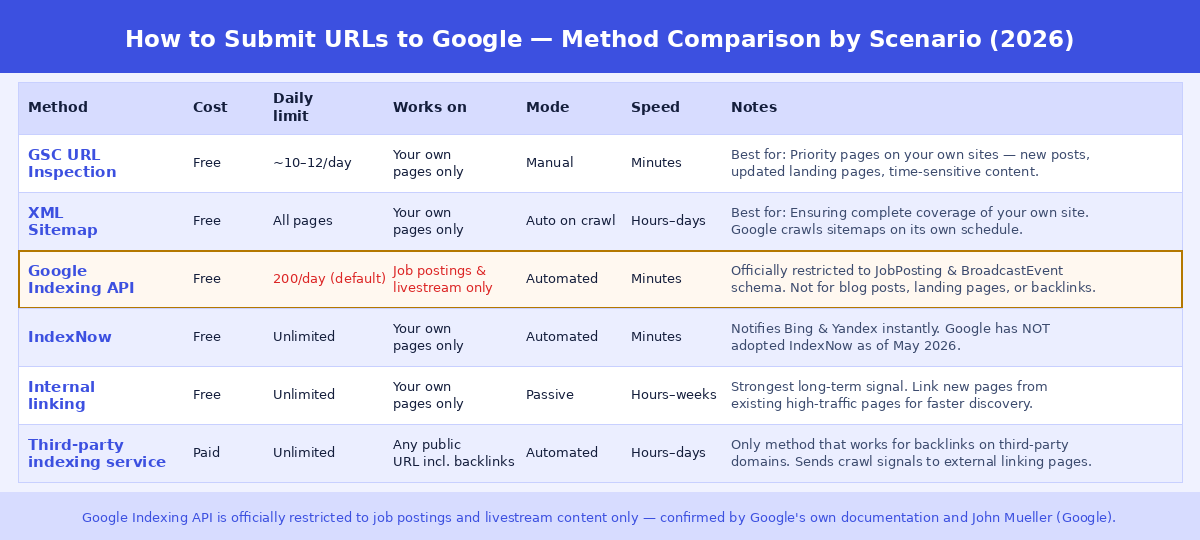
Which method to use for your situation
New blog post or landing page on your own site, published today: Submit via GSC URL Inspection immediately. Ensure it's in your sitemap. Add an internal link from a relevant existing page.
Large batch of new pages on your own site (50+ URLs): Update your sitemap and resubmit it in GSC. Use GSC URL Inspection only for the highest-priority pages from the batch — you'll hit the daily limit quickly. For the rest, sitemap submission and strong internal linking are your tools.
Updated existing page with significant content changes: GSC URL Inspection with "Request Indexing" prompts Google to recrawl with fresh eyes. Particularly important after fixing pages that were previously "Crawled — currently not indexed" due to thin content.
Job board or livestream video platform: Google Indexing API is the right tool and it's genuinely appropriate for this use case. Implement it with proper JobPosting or BroadcastEvent structured data.
High-volume content site needing Bing indexation: IndexNow via your CMS plugin. Automates Bing and Yandex submission on publish. Doesn't affect Google but valuable if Bing traffic matters to your audience.
Backlinks on third-party domains: Third-party indexing service. Wait 7–14 days after link placement, run a bulk index check to confirm which links are unindexed, then submit those linking page URLs. See the full workflow in Backlinks Not Getting Indexed? Here's Why and How to Fix It.
Why manual submission doesn't guarantee indexation
Submitting a URL to Google through any of these methods is a request, not a command. Google decides independently whether to include any page in its index based on its assessment of content quality, uniqueness, and relevance.
A page submitted via GSC URL Inspection can still end up with "Crawled — currently not indexed" if Google determines the content doesn't meet its quality threshold. Common reasons: thin or duplicate content, pages that primarily exist to host links rather than serve users, content that closely mirrors other indexed content, and pages on domains with a history of low-quality content.
The submission method gets Google to look at the page sooner. Whether it indexes depends on what Google finds when it gets there.
This is why the sequence matters: fix technical and quality issues before submitting for indexation, not after. Check for noindex tags, robots.txt blocks, canonical misconfigurations, and thin content before spending time on submission methods. A page with a noindex tag will never index no matter how many times you submit it.
How to submit URLs to Google in bulk
Everything above works one URL at a time. Once you have a few hundred URLs, the manual route stops being practical — the daily quota alone makes it impossible, and the URL Inspection API is capped at 2,000 inspections per property per day.
There are three realistic options at volume. A sitemap submitted in Search Console handles your own pages well, though discovery is passive and can be slow. The Indexing API is fast but restricted: Google documents it for JobPosting and BroadcastEvent content only, so it does not apply to ordinary pages or backlinks. And for URLs on sites you do not own, a third-party indexing service is the only route available.
Before submitting anything in bulk, check what is already indexed — there is no sense spending effort on URLs Google already has. Our guide to bulk index checking covers that workflow, and UltraIndexer's bulk index checker handles up to 5,000 URLs per run.
Frequently asked questions
How long does it take for a URL to index after submission via GSC?
After requesting indexing via GSC URL Inspection, Google typically crawls the submitted URL within a few hours. Whether it then appears in search results depends on the indexation decision — most quality pages from established sites appear in Google within 24 hours of the crawl. For new domains or pages with limited authority signals, it can take days to weeks regardless of submission.
Can I submit a competitor's page to Google for indexing?
You can't submit a third-party URL through GSC (you don't have verified access to their property). You can't use the Indexing API or IndexNow on domains you don't own. There is no official mechanism for submitting third-party pages to Google. If you're trying to ensure backlinks on competitor sites get indexed, that's a different use case — third-party indexing services send crawl signals to any public URL.
Does submitting a URL multiple times speed up indexation?
Submitting the same URL via GSC URL Inspection multiple times in quick succession doesn't meaningfully accelerate indexation. Google adds it to its priority crawl queue on the first submission; repeated submissions don't move it further up the queue. Wait at least 24 hours before re-submitting, and focus on fixing any quality issues that might be causing the page to be crawled but not indexed.
Is the Google Indexing API safe to use for regular blog content?
No. Google's documentation explicitly restricts it to JobPosting and BroadcastEvent structured data. John Mueller has publicly advised against using it for other content types. Sites that have used it for general content have reported short-term indexation speed improvements followed by index volatility after Google updates. The documented and official methods — GSC URL Inspection and sitemaps — are the appropriate tools for blog content.
Does IndexNow work for Google?
No. As of May 2026, Google has not adopted IndexNow. The protocol works for Bing and Yandex. If you implement IndexNow, expect faster Bing and Yandex indexation but no direct effect on Google. For Google specifically, continue using GSC URL Inspection and sitemaps.
How do I know if my URL submission worked?
After submitting via GSC URL Inspection, return to the same URL in the tool after 24 hours. The "Coverage" status will show whether Google has indexed the page. "URL is on Google" confirms indexation. "Crawled — currently not indexed" means Google visited it but chose not to include it — the next step is addressing the content quality issues causing that decision. "Discovered — currently not indexed" means Google knows the URL exists but hasn't crawled it yet — this can happen even after a manual submission if the crawl queue is busy.
What's the fastest way to get a URL indexed by Google?
For your own pages: GSC URL Inspection combined with a strong internal link from an already-indexed, frequently-crawled page. The internal link gives Googlebot an immediate crawl path; the GSC submission adds the URL to the priority queue. Together, this is the fastest available legitimate indexation signal. For backlinks on third-party sites: a third-party indexing service targeting the linking page URL, combined with social signals pointing at that page.
Can I submit a URL to Google without signing in?
Not anymore. Google retired its public Add URL form, and the replacement — Search Console's URL Inspection tool — requires a Google account and a verified property. There is no signed-out submission method today.
How many URLs can I submit to Google per day?
Search Console's URL Inspection tool allows roughly 10 to 12 manual submissions per property per day. The URL Inspection API is separately capped at 2,000 inspections per property per day. Both limits apply only to properties you have verified.
How do I submit a URL I don't own, like a backlink?
You cannot, through Google's own tools — Search Console only covers verified properties. Backlinks on third-party sites have to be discovered by Google's crawler naturally, or pushed through a third-party indexing service.
ULTRAINDEXER
The only method that works for backlinks on third-party sites
Submit the linking page URLs — not your own site. Dual-phase indexing, 1–31 day drip feed, verified 7-day per-URL report. Check which links are indexed first, then submit only the unindexed ones.
Indexing from $9 · Checking from $29 · Credits never expire · No subscription