How to Get Your Backlinks Indexed by Google (Step-by-Step)
Knowing your backlinks aren't indexed is one problem. Knowing exactly what to do about it — in what order, with which tools, for which link types — is a different problem entirely. Most guides give you a list of methods and leave you to figure out the rest.
This guide gives you a proper workflow. Six actions, priority-ordered from highest to lowest impact, with clear guidance on when each applies and which link types respond to it. No wasted effort on low-ROI steps before you've done the high-ROI ones first.
If you're looking for background on why backlinks fail to index in the first place, or how to diagnose which specific links are unindexed, those topics are covered in detail in two companion posts: How to Index Backlinks Fast: The Complete 2026 Guide and Backlinks Not Getting Indexed? Here's Why and How to Fix It. This post focuses entirely on action — what to do, in what sequence, once you've confirmed a backlink isn't indexed.
The right mindset before you start
Two things are true about backlink indexation that most guides don't state clearly enough:
First, you cannot force Google to index anything. You can improve conditions, generate signals, and increase the probability of indexation — but Google makes every indexing decision independently. Any service claiming to guarantee indexation of specific URLs is overstating what's possible.
Second, most effort is wasted by acting too early or applying the wrong method for the link type. A link building campaign with 500 backlinks doesn't need 500 indexing service submissions on day 3. It needs a structured workflow that respects timelines, confirms failures accurately, and applies appropriate interventions at the right moment.
The six steps below are ordered by impact and logical sequence. Work through them in order — don't skip to step 4 before completing steps 1 and 2.
The priority-ordered indexing workflow
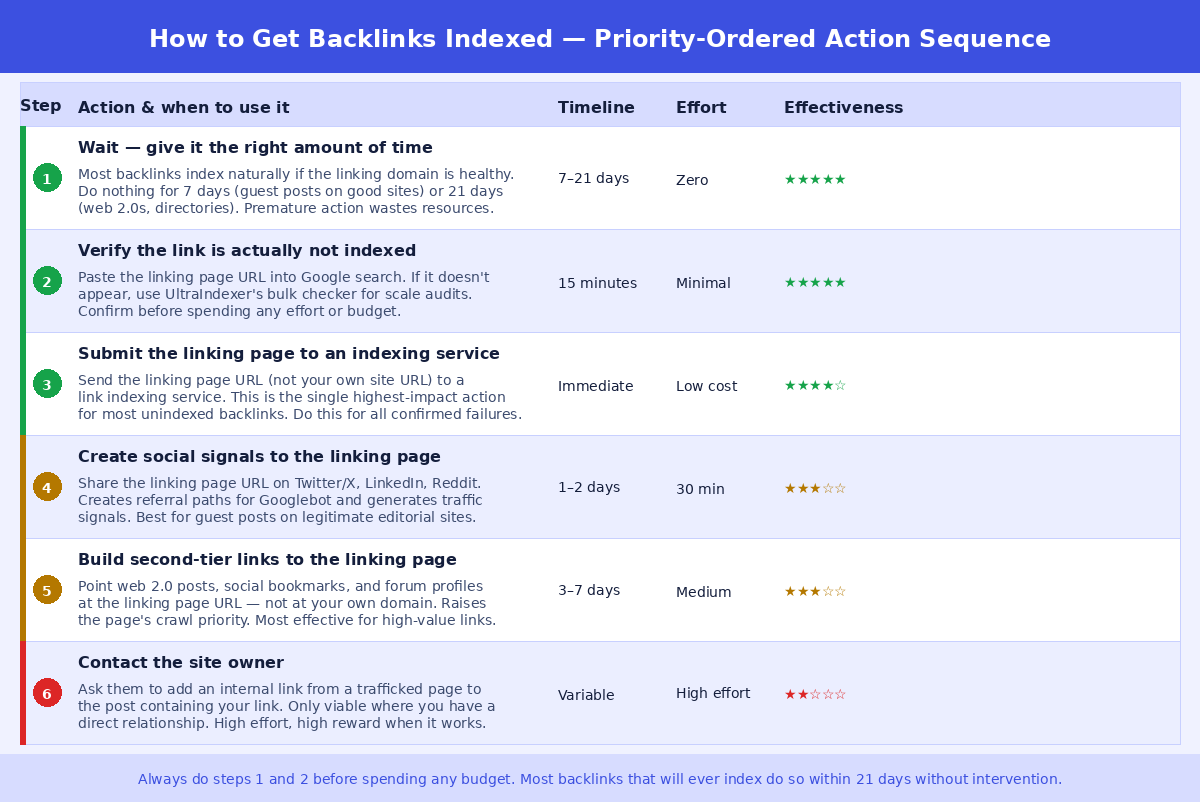
Step 1: Wait — and wait the right amount of time
The single most common mistake in backlink indexation is checking too early and treating normal crawl delays as failures. Google's crawl scheduling is not instant, and the right waiting period varies significantly by link type.
For guest posts on well-established sites with regular traffic and daily Googlebot activity, indexation within 24–72 hours is realistic. For a guest post on a mid-tier niche site with modest traffic, 7–14 days is normal. For web 2.0 posts, citations, forum profiles, and directories, 21–30 days is a reasonable minimum before treating non-indexation as a problem requiring intervention.
Submitting links to an indexing service on day 2 when they would have indexed naturally by day 10 wastes budget and tells you nothing useful. The waiting step isn't passive — it's a deliberate decision to let natural indexation happen before spending resources on intervention.
Set a calendar reminder based on the link types in your campaign. Check at the appropriate interval, not before.
Step 2: Verify accurately which links are actually not indexed
Once the appropriate waiting period has passed, confirm which specific linking pages are unindexed. Do not rely on third-party SEO tools for this confirmation — Ahrefs, Semrush, and Majestic use their own crawlers, which are independent of Google's index. A link appearing in Ahrefs and a link being in Google's index are two separate facts.
For individual checks, paste the exact linking page URL directly into Google search. If the page appears in results, it's indexed. For campaign-scale checks — dozens or hundreds of links — use a bulk index checker that queries Google directly and returns a per-URL result.
UltraIndexer's Index Checking product handles this at scale: submit up to 5,000 URLs per batch, get an indexed or not-indexed result for each, and download a CSV report. At $0.0029 per check, verifying 300 backlinks costs under $1. Run this check at 14 days and again at 30 days for a complete picture.
The output of this step is a confirmed list of unindexed linking page URLs. This list drives everything that follows — only proceed to steps 3–6 for confirmed failures, not for links you haven't checked properly.
Step 3: Submit the linking page to a link indexing service
For confirmed unindexed backlinks, submitting the linking page URL to a dedicated link indexing service is the highest-impact intervention available to you. This is the step that moves the needle for the majority of genuinely unindexed links that don't have a technical blocker (noindex tag, robots.txt block) preventing indexation.
How link indexing services work: they send crawl signals — references from crawl-ready properties, pings to indexing APIs, and other signals that indicate a URL is worth visiting — to the linking page URL. The effect is to make Google prioritise crawling that specific page sooner than it would in its normal crawl schedule. It doesn't override Google's quality assessment, but it accelerates the discovery and crawl steps that precede it.
The critical thing to get right: submit the linking page URL — the URL of the page on someone else's domain that contains your backlink — not your own website's URL. The indexing signals need to point at the page hosting your link, not at the destination. This is the single most common error in link indexer usage.
If you're using UltraIndexer's indexing service, the workflow is: export your confirmed unindexed linking page URLs → submit them as a batch → select your drip feed schedule (1–31 days) → receive a verified 7-day report showing indexed or not-indexed status for each submitted URL. The report tells you definitively which links indexed following submission and which didn't, so you know whether to proceed to steps 4–6 or write them off.
For most campaigns, steps 1–3 resolve the majority of indexation issues. Steps 4–6 are for links that remain unindexed after step 3 — higher-effort interventions reserved for higher-value placements.
Step 4: Create social signals pointing to the linking page
Social signals work by creating referral paths that Googlebot follows — each platform link is an additional route by which Google can discover and visit the linking page. They also generate the kind of engagement signals (real traffic, time on page) that indicate a page has genuine relevance.
The mechanics: share the linking page URL (not your own site URL) on Twitter/X, LinkedIn, Reddit, and any relevant community where the content is contextually appropriate. For a guest post on a content marketing blog, sharing in marketing communities on Reddit or LinkedIn is natural. For a citation on a local business directory, a brief share from the business's social accounts is sufficient.
The word "natural" matters here. Sharing from accounts that exist purely to generate signals, or posting the same URL across 30 platforms in one day, creates a pattern that's easy for Google to discount. A few genuine shares from accounts with real history and followers are more effective than mass-posting to signal farms.
This step is most effective for guest posts on editorial sites where social sharing is contextually appropriate. For web 2.0 properties, forum profiles, and directories, the incremental impact of social signals is lower, and the effort may not justify the return unless it's a high-value placement.
Step 5: Build second-tier links pointing to the linking page
Second-tier link building means creating backlinks that point to the page hosting your link, rather than to your own domain. The goal is to increase the linking page's authority signals and make it a higher-priority crawl target for Googlebot.
This works because Google's crawl prioritisation is partly driven by how many external references point to a given URL. A page with more inbound links gets crawled more frequently and is treated as a higher-priority target when Google schedules recrawls. Adding second-tier links to an unindexed or slowly-indexing page can move it up in Google's crawl queue.
Common second-tier link sources: web 2.0 posts (WordPress.com, Medium, Blogger), social bookmarks (Reddit, Pinterest, Mix), forum profile links, and RSS feed submissions. The links don't need to be high authority — their purpose is to create crawl signals and inbound references for the linking page, not to pass significant ranking value to it.
Second-tier link building is most justified for high-value placements — editorial guest posts, niche edit links on established sites, or any placement where the cost of the original link was meaningful. For bulk lower-tier links like web 2.0 posts and forum profiles, the effort of building second-tier links often exceeds the value of the underlying placement.
Step 6: Contact the site owner
Asking the site owner to add an internal link from a high-traffic page to the post containing your backlink is the highest-effort option in this workflow, but it can be highly effective when it works.
The reason it works: internal links from high-traffic, frequently-crawled pages pass crawl priority to the pages they link to. If a site's homepage or a popular article links to the post with your backlink, Googlebot will visit that post much sooner than it would based on the post's own crawl signals alone.
The practical limitation is relationship access. This option is only viable if you have a direct relationship with the site owner or the editor who published your content. Many link building transactions are purely transactional — you pay, you get a link, communication ends. In those cases, follow-up contact requesting additional internal links is often not possible or not welcomed.
When you do have the relationship, the ask is simple: "I noticed the post hasn't been indexed yet — would you be able to add a link from [specific high-traffic page] to the post? It would help Google discover it faster." Most legitimate site owners are willing to do this if the request is specific and reasonable.
Which methods to use for which link types
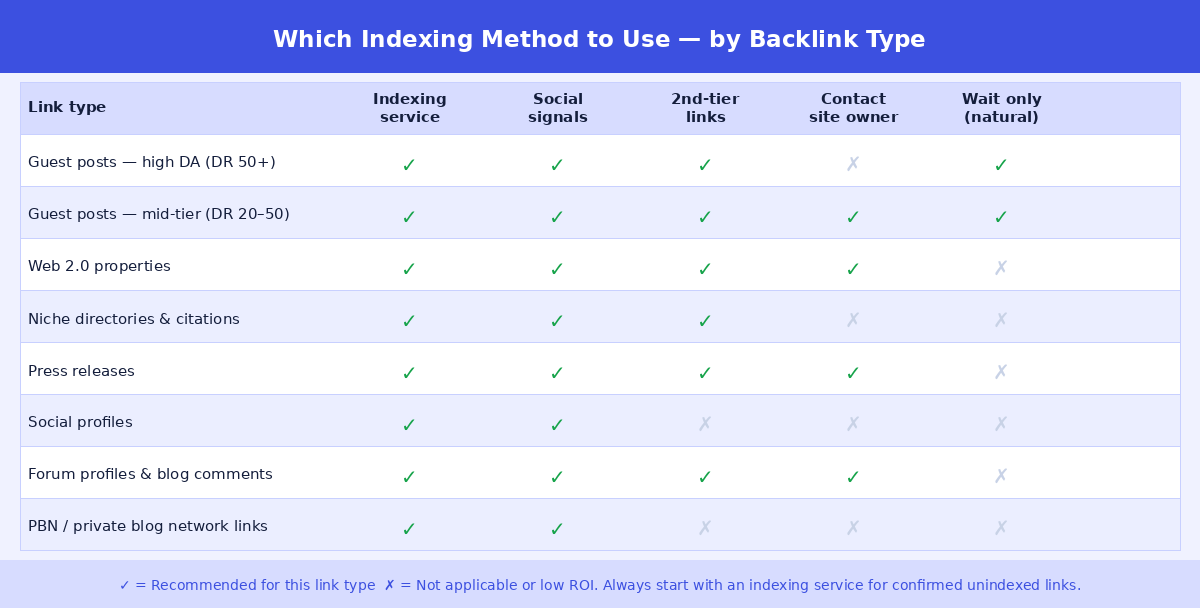
Not every method is appropriate for every link type. The matrix above shows which interventions make sense for which backlink categories. Here's the reasoning behind the key decisions:
High-DA guest posts warrant the full toolkit — steps 3, 4, and 6 (indexing service, social signals, and site owner contact) — because the value of the placement justifies the effort. For these links, going through all applicable steps before writing off a non-indexed link makes sense.
Web 2.0 properties and directories should get steps 3 and 4 (indexing service and social signals) but not step 6 — you typically don't have a direct relationship with web 2.0 platform owners, and the value of the individual placement doesn't justify the effort of trying to establish one.
Social profiles index via their own platform mechanisms. Submitting social profile URLs to an indexing service is generally sufficient. Second-tier links and site owner contact are not applicable.
PBN links should only receive indexing service submission (step 3). Social signals pointing at PBN pages are counterproductive — you don't want to draw attention to the pattern. Second-tier links to a PBN page serve little purpose since the PBN's value comes from its existing authority, not from links to it.
Building a repeatable indexation workflow for campaigns
For link building at any meaningful scale, running individual checks and interventions link-by-link isn't viable. Here's a repeatable workflow structure that applies the priority-ordered steps systematically across a full campaign:
Day 0 — Link placement: Log each linking page URL, the link type, and the placement date in your tracking sheet. Set a first-check date column based on link type (14 days for guest posts, 30 days for web 2.0s and directories).
First check window: Run a bulk index check on all links that have reached their first-check date. Export the confirmed unindexed URLs. Immediately submit them to an indexing service (step 3). For guest posts specifically, also schedule social sharing (step 4) within the same week.
30-day check: Re-check all links submitted to an indexing service at first-check. For any still unindexed, apply step 5 (second-tier links) for high-value placements. Update your tracking sheet with current status.
60-day final assessment: Any link still unindexed at 60 days, despite submission to an indexing service and social signals, should be assessed for write-off or escalation to step 6. Document the outcome — persistent non-indexation patterns from a specific supplier or site type are signals worth tracking for future campaign planning.
This workflow ensures every link gets a fair window, every intervention is applied in priority order, and no resources are wasted on steps 4–6 for links that resolve at step 3.
What to do when nothing works
Some backlinks will not index regardless of what you do. This is a normal outcome, not a failure of the workflow. Google's indexing is selective, and certain pages — thin content, low-authority domains with poor crawl history, pages that exist primarily to host links — are systematically deprioritised or excluded from the index.
When a link remains unindexed after the full workflow, the right response depends on the link type:
For high-value placements (editorial guest posts, niche edits on established sites), check for a noindex tag or robots.txt block. If present, request removal from the site owner or treat the placement as a failed delivery and request a replacement. If no technical blocker exists and the link is still unindexed after 60 days with all interventions applied, the linking page's content quality or the domain's crawl history is the likely cause — factors outside your control.
For volume link types (web 2.0s, forum profiles, directories), accept a baseline non-indexation rate as normal and build it into your campaign expectations. As discussed in the Backlinks Not Getting Indexed guide, non-indexation rates for lower-authority link types can be 30–60%. Pursuing each individual failure is not a good use of time — focus on the rate across the campaign, not individual links.
Frequently asked questions
Should I submit every backlink to an indexing service immediately after placement?
No. Submit only confirmed unindexed links after the appropriate waiting period. Submitting links that would have indexed naturally wastes budget and skips the verification step — meaning you don't know which links were actually problematic. Wait, verify, then submit confirmed failures.
How many times should I submit the same linking page URL to an indexing service?
Once per unindexed link, per check cycle. If a link isn't indexed 30 days after submission, a second submission is reasonable before moving to steps 4–5. Beyond that, repeated submissions to the same indexing service for the same URL are unlikely to produce different results — the issue is almost certainly a quality or technical blocker, not a lack of crawl signals.
Does sharing the linking page on social media risk alerting Google to an artificial link?
For legitimate link placements on genuine sites, social sharing looks natural and is unremarkable to Google. For PBN links or any placement on a site that clearly exists only to host paid links, avoid drawing additional attention to the page. If you'd be uncomfortable with Google knowing the link exists, don't create additional signals pointing at it.
Can I use IndexNow to index my backlinks?
IndexNow is a protocol that lets site owners notify search engines of URL changes. It requires verification of the domain — meaning you can only use IndexNow for pages on your own sites, not for third-party linking pages. It's useful for your own site's content but isn't applicable to backlink indexation on external domains.
My backlink indexed for a few days then disappeared from Google. What happened?
This is deindexation — Google indexed the page, then later made a quality decision to remove it. Common causes: the linking page's content was updated or degraded after initial indexation, the domain's overall quality dropped (possibly due to other pages published on the same site), or Google's algorithm reassessed the page's value. If the linking page still exists and still hosts your link, resubmit through an indexing service and monitor. If it deindexes again, the domain is likely the cause.
Is there a way to request Google to index a specific third-party page?
No. Google's "Request Indexing" feature in GSC only works for properties you've verified — your own domains. You cannot request indexing of a third-party page through any official Google tool. Indexing services and the other interventions in this guide are the practical alternatives.
INDEXING + INDEX CHECKING
Check which backlinks are indexed — then index the ones that aren't
Bulk check up to 5,000 URLs. Get a per-URL result. Submit confirmed failures directly for indexing — drip feed 1–31 days, 7-day verified report. All in one platform.
Checking from $29 · Indexing from $9 · Credits never expire · No subscription