How to Index Backlinks Fast: The Complete 2026 Guide
Here's a number most link builders don't want to think about: somewhere between 20% and 40% of backlinks are never indexed by Google. Build 100 links, and up to 40 of them could be completely invisible — passing zero authority, moving no rankings, generating no return on the money and time you spent acquiring them.
That's not a fringe problem. It affects almost every link building campaign, at every budget level.
The frustrating part is that the SEO industry talks endlessly about acquiring backlinks. Domain Rating. Editorial placements. Link velocity. Anchor text ratios. But the step that actually makes a link count — getting Google to index it — gets a fraction of the attention it deserves.
This guide fixes that. It covers exactly how to index backlinks fast — why they fail, how to diagnose the problem, and which method to use for which situation. There's a decision matrix, timeline data by link type, and a workflow built specifically for agencies managing links at scale.
No recycled advice from 2017. Just what's working now.
What "indexed" actually means for a backlink
Most explanations of indexing stop too early. They say something like "indexed means Google has added the page to its database" — which is technically true, but doesn't tell you anything useful about whether your link is working.
When it comes to a backlink specifically, Google has to complete six distinct steps before that link passes any value to your site:
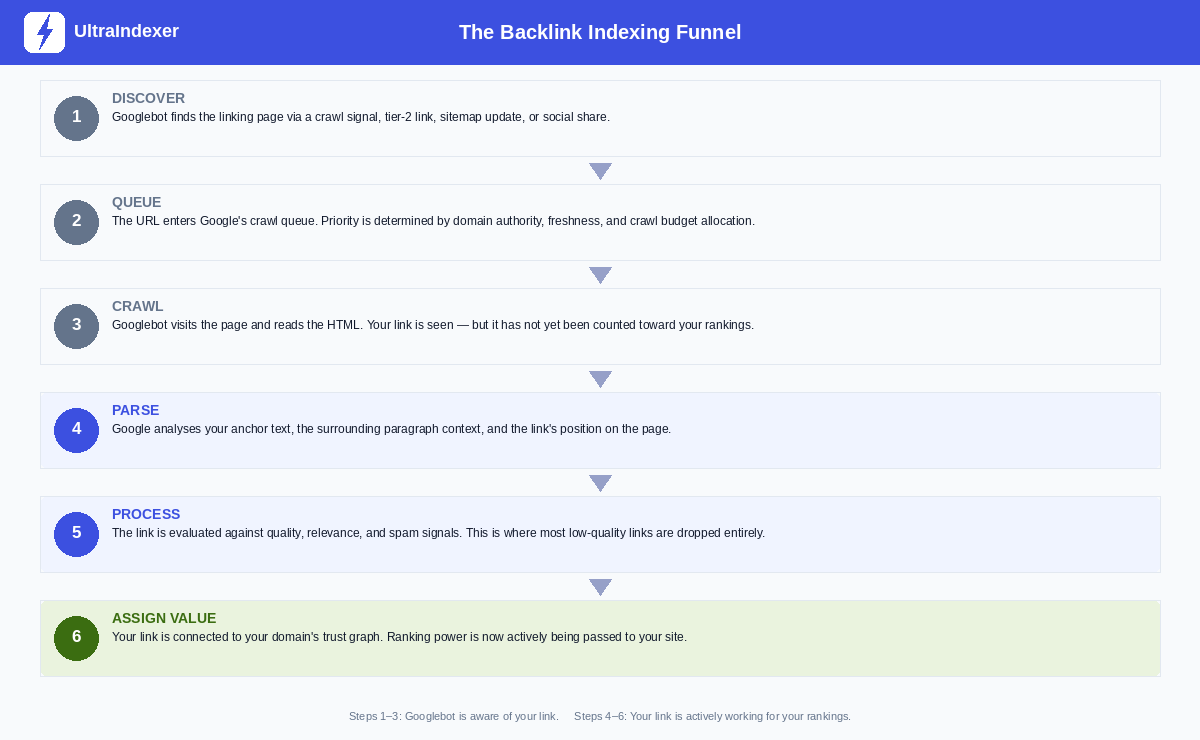
Steps 1 through 3 — Discover, Queue, Crawl — mean Googlebot has found the page and read it. Your link has been seen. But it hasn't been counted.
Steps 4 through 6 — Parse, Process, Assign Value — are where the actual work happens. Google analyses your anchor text, evaluates the surrounding content, checks the link against quality and spam signals, and finally connects it to your domain's trust graph.
This is why "crawled" and "indexed" are not the same thing. A page can be crawled and still not pass any link value if it fails at the Process stage. And a link can appear in Ahrefs or Semrush — because those tools crawl independently — while Google has never processed it at all.
Until all six steps are complete, your backlink is text on a page. Nothing more.
Why Google ignores your backlinks
Understanding the six-step funnel makes it much easier to diagnose why a specific link isn't getting indexed. In almost every case, it fails at one of these points:
The linking page isn't crawled often. Every domain has a crawl budget — an allocation of resources Google dedicates to crawling it. Smaller, lower-traffic sites get visited less frequently. A new guest post on a DR22 blog that gets 200 organic visits a month might not be recrawled for weeks after publication.
The page has no traffic signals. Google pays attention to whether real users visit pages. A page with zero organic traffic, no referring visitors, and no engagement is a low-priority target for recrawling. Your link can sit there undisturbed for months.
The link is buried in the wrong place. Links in footers, sidebars, and comment sections are treated with much lower weight than links inside the main content. If your link is one of 40 outbound links on a page, in a sidebar widget, surrounded by unrelated content, Google may crawl the page and still not process your link properly.
The content on the linking page is thin. Post-Helpful Content Update, Google is more aggressive about deprioritising pages it considers low-quality. Thin articles, AI-generated content that reads like no human wrote it, and pages that clearly exist only to host links are crawled less often — and when they are crawled, the links on them carry less weight.
No crawl-worthy event has occurred since the page was published. Googlebot revisits pages when something triggers it to — a new internal link pointing to the page, a social share, an RSS feed update, an external crawl signal. If the page has been sitting untouched since it was published, there's nothing prompting a revisit.
The linking page itself isn't indexed. This is the most overlooked reason of all. If the page your link lives on isn't in Google's index, your backlink has zero chance of being processed. Always check this first.
What a good indexing rate actually looks like
Before you try to improve your indexing, you need to know what to aim for. Most SEOs don't have a benchmark — they just assume all their links are working.
In practice, indexing rates vary significantly by link type. Niche edits — links placed inside existing articles on established, high-traffic sites — tend to index fastest because the pages they live on already have strong crawl signals. Forum comments on low-authority sites can sit unindexed for months, or never index at all.
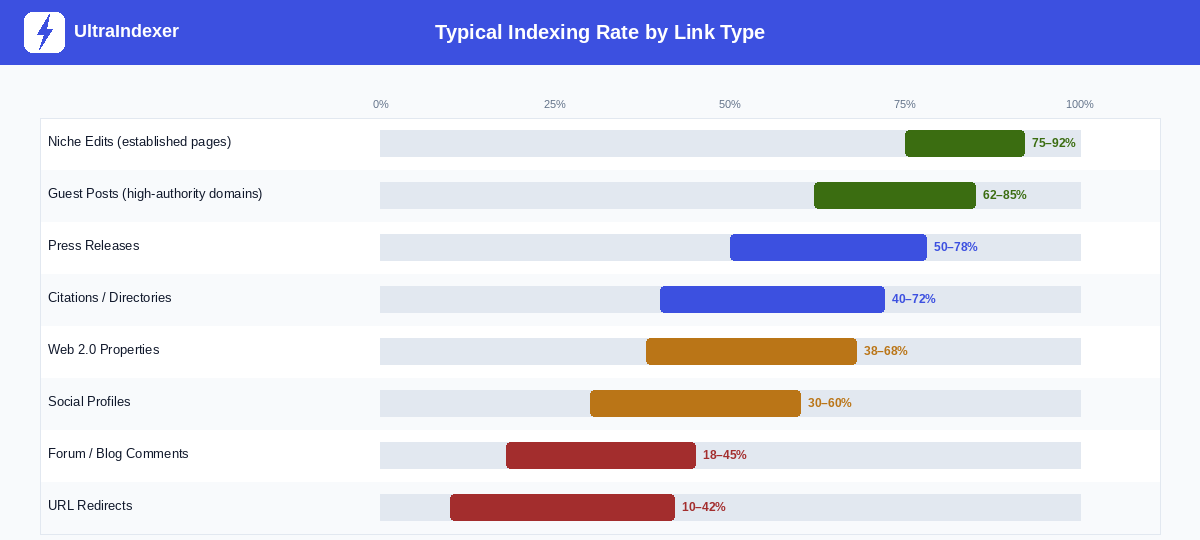
A few things worth noting about these ranges:
First, they assume reasonable link quality. A guest post on a genuinely active blog with real traffic will index at the high end of that 62–85% range. A guest post on a site that publishes three AI articles a day and has no organic traffic will underperform significantly.
Second, a 100% indexing rate is not a realistic target — and it's not necessarily desirable. Some links live on pages that Google has chosen not to crawl frequently, and that's often a signal about the quality of those pages. Chasing 100% can lead you to tactics that do more harm than good.
A reasonable target for a well-run agency link building campaign: 65–80% of links indexed within 30 days. If you're consistently below 50%, something is wrong — either with link quality, or with your indexing process.
Check your indexing rate before doing anything else
This is the step most SEOs skip entirely. They build links, assume they're working, and move on. Then they wonder why rankings aren't moving despite a growing link profile.
Measure first. Then act.
For individual links — the site: operator. Type site:https://example.com/page-with-your-link into Google. If Google returns the page in results, it's indexed. If nothing comes back, it isn't. This works for checking a handful of links but becomes impractical at scale.
For links you can access — Google Search Console. If you have access to the site where the link lives (your own web properties, guest post sites you manage, web 2.0s), use URL Inspection in GSC. It tells you whether the specific page is indexed, when it was last crawled, and whether there are any crawling issues.
For bulk campaigns — an index checker. If you're running campaigns with 50, 100, or 500 links, manual checking isn't realistic. A dedicated index checking tool lets you upload a list of URLs and get indexed / not indexed status back for all of them in one pass. This gives you the baseline you need to triage intelligently — which links need attention, and which are already working.
Once you have your baseline, you're ready to act on it. The next section tells you how.
Which indexing method should you actually use?
Every guide on this topic gives you a list of methods and leaves you to figure out which one applies to your situation. That's not useful. The right method depends on whether you control the site, what the link type is, and how many links you're dealing with.
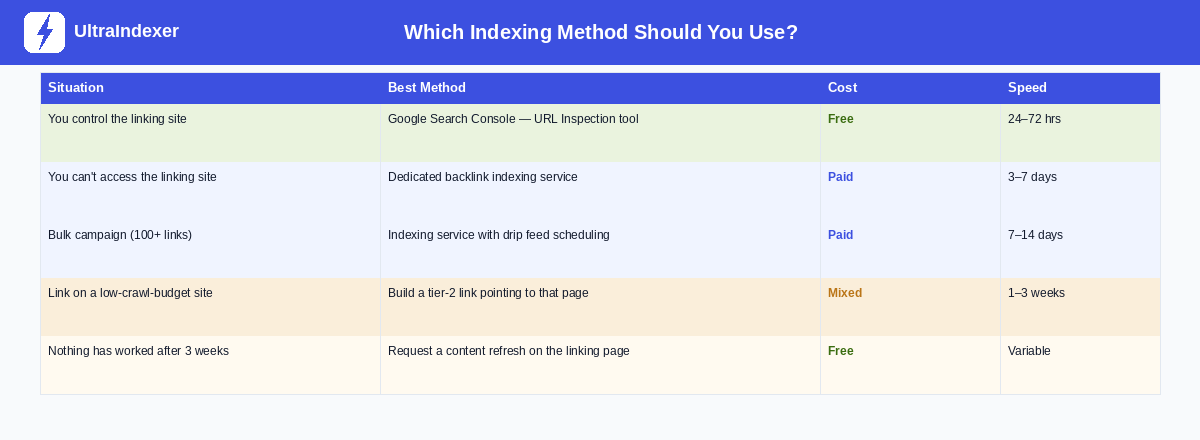
Start with your situation, not the method. The sections below cover each approach in the order that most people will reach for them.
Method 1: Build links on pages Google already crawls
The single best thing you can do for backlink indexing happens before the link is even built. Choose link sources that Google is already actively crawling.
When you evaluate a potential backlink opportunity, these are the questions that matter:
Is the page already in Google's index? Type site:[domain.com] into Google. If the domain has no indexed pages, any link you place there has to wait for that domain to get indexed first — which may never happen.
Does the page get organic traffic? A site getting consistent organic visits is being crawled regularly. That means new content — including your backlink — gets discovered faster. You can check this with Semrush, Ahrefs, or similar tools.
How often does the site publish new content? Sites that post regularly get recrawled regularly. A blog that hasn't published anything in 18 months may not see Googlebot for months at a time.
This is why niche edits — links placed inside existing, established articles — often index faster than new guest posts. The page your link lives on is already indexed, already getting traffic, and already being recrawled. Your link is discovered on the next crawl, which may be within days.
Method 2: Google Search Console URL Inspection
If you have access to the site where the link lives — your own web properties, guest post sites you've been given access to, web 2.0 properties — URL Inspection in Google Search Console is the most direct way to request indexing.
The process is straightforward:
Add the site to Search Console if it isn't already there. Go to URL Inspection, paste the exact URL of the page containing your link, and click "Request Indexing." Google typically processes these requests within 24–72 hours, though it can take longer on lower-priority domains.
Two things to know about this method. First, Google limits submissions to 200 URLs per day per verified property. If you have a large batch of guest posts on sites you control, prioritise the ones with the highest-value links. Second, this method only works if you have Search Console access for the property. For most third-party link placements — links you've earned on other people's sites — you'll need a different approach.
One more thing: if GSC repeatedly returns "URL is not on Google" despite multiple requests, stop submitting. That's a signal about the page or domain, not about your request. Check whether the domain itself has indexing issues.
Method 3: Trigger a crawl-worthy event
Googlebot doesn't crawl pages on a fixed schedule. It revisits pages when something signals that a revisit is worthwhile. You can manufacture those signals.
RSS feed pings. Most WordPress and CMS-based sites have a built-in RSS feed. When a page is published or updated, the feed updates, and feed aggregators notify search engines. If your backlink lives on a WordPress blog, the page was likely pinged when it was first published. If it still hasn't indexed after two weeks, ask the publisher to make a minor update to the post — even adding a sentence or updating a statistic — which will trigger a fresh ping.
Social sharing. Googlebot crawls certain social platforms constantly because those platforms update in real time. Sharing the URL of the linking page on Reddit, X (Twitter), and Pinterest creates additional discovery pathways. Reddit is particularly effective — it's crawled more aggressively than almost any other platform, and a link shared in a relevant subreddit can be discovered within hours. LinkedIn and Facebook are slower but still useful. Share the linking page URL, not your own site's URL.
Internal links on the same domain. If the publisher has other indexed, well-crawled pages on their site, ask them to add an internal link from one of those pages to the article containing your backlink. Googlebot follows internal links during crawls. A fresh internal link pointing to an uncrawled page is one of the most reliable ways to get it discovered quickly.
Method 4: Tiered linking
This method has a bad reputation because it's often described in the context of PBNs and spam networks, which is not what we're talking about here.
Tiered linking for indexing purposes is simple: you build a second-level link that points to the page containing your backlink, not to your own site. This second link creates a crawl signal that pushes Googlebot to visit the page your primary link lives on.
What makes a good tier-2 link for this purpose: it needs to be on a page that's already indexed and already gets some crawl frequency. A relevant blog comment, a social media post, a forum thread, or a mention on a Web 2.0 property can all work. The goal isn't to pass ranking power through the tier-2 link — it's purely to create a crawl signal.
What ruins a tier-2 approach: using PBNs, spam directories, or low-quality Web 2.0 farms. If your tier-2 links are on pages that Google doesn't crawl either, you've solved nothing. And if Google associates your indexing pattern with manipulative behaviour, you've made things worse.
Realistic expectation: a good tier-2 link will typically get the target page crawled within one to three weeks. It's slower than GSC or an indexing service, but it's free and requires no special access.
Method 5: Use a dedicated backlink indexing service
When you can't access the linking site directly and don't want to wait weeks for natural crawling, a dedicated indexing service is the practical solution. This is especially true for agencies running campaigns with dozens or hundreds of links per month.
What indexing services actually do. They submit your URLs to a coordinated pinging workflow — notifying search engine crawlers, updating aggregators, triggering RSS signals, and creating crawl events across a network of sources. Done properly, this replicates the natural signals that a high-traffic page would generate organically, but does so on demand.
Why drip feed scheduling matters. This is something almost no guide covers, and it's important. Submitting 500 URLs to an indexing service in a single batch on day one creates an unnatural pattern. Google's crawl systems are trained to recognise link velocity signals. Suddenly pinging hundreds of pages at once looks different from the organic way links accumulate over time.
A well-designed indexing service lets you spread submissions over days or weeks — a schedule that mirrors how links naturally appear. If you're building 100 links over a month, submitting them in daily batches of 10 to 15 looks a great deal more natural than submitting all 100 on the first day. This isn't just about avoiding penalties — it genuinely improves indexing rates because the crawl signals are distributed in a pattern that looks trustworthy.
At UltraIndexer, submissions can be spread across 1 to 31 days. You choose the pace based on your campaign size. Every submission comes with a per-URL report after 7 days so you can see exactly which links indexed and which didn't — and then triage the ones that need follow-up.
What to look for in an indexing service:
- Published indexing rates by link type — not a blanket "90% guaranteed" claim
- Per-URL reporting so you can see actual results, not just a summary
- Drip feed scheduling for larger campaigns
- Transparent methodology — what signals are they sending and how
What to avoid: Any service that guarantees 100% indexing. No legitimate service can promise this — some links will never index regardless of what you do, and a tool claiming otherwise is either lying or using aggressive tactics that carry risk.
What doesn't work anymore
Some tactics that worked five years ago now either do nothing or actively cause problems. It's worth being direct about them.
Mass pinging services. Tools that submit your URL to 300 ping sites in one go. These were moderately effective in 2014. Today, Google has largely devalued signals from those aggregators, and submitting the same URL to hundreds of them at once creates exactly the kind of unnatural pattern that triggers scrutiny.
XML sitemap blasting. Creating a sitemap just for your backlink URLs and submitting it repeatedly. Sitemaps help Google discover pages you control. They have very little effect on getting third-party links indexed, because the sitemap is on your domain, not on the domain where the link lives.
Resubmitting the same URL to GSC repeatedly. Once is enough. Submitting the same URL five times in a week doesn't increase the priority of the request — it just creates noise. If a URL isn't indexing after a GSC request, the problem is with the page, not with the number of requests.
Bulk social media spam. Sharing your link on 50 Facebook groups and 30 Twitter accounts in one day. Platforms have rate limiting and spam detection. A single well-placed share on a relevant subreddit with real community engagement is worth more than 50 spam posts.
Low-quality Web 2.0 link networks for tier-2s. If your tier-2 links are on Weebly pages that have no content and no traffic, they're not creating any crawl signals. They're just adding to the noise.
When nothing is working: troubleshooting unindexed links
You've waited three weeks. You've tried GSC, social signals, and a tier-2 link. The backlink still isn't indexed. Here's how to diagnose what's actually going wrong.
Is the linking page itself indexed? Check site:[domain.com/exact-page-url] in Google. If nothing comes back, the page your link lives on isn't indexed. No method for indexing your backlink will work until this is resolved. The publisher needs to fix whatever is preventing their own page from indexing.
Is there a noindex tag on the page? Ask the publisher to check the page source for <meta name="robots" content="noindex">. Some CMS configurations add noindex to categories, tags, or new posts by default. It's more common than you'd think, and it's an instant explanation for a link that will never index.
Is the link inside JavaScript-rendered content? If your link appears inside a React or Vue component that requires JavaScript to render, Googlebot may not see it at all. Standard HTML links are parsed during crawl. JS-rendered links require a second-pass rendering step that doesn't always happen for lower-priority pages.
Is the domain penalised or deindexed? Check site:[domain.com] with just the root domain. If Google returns zero results for a domain that clearly has content, the domain may have a manual action or be partially deindexed. Links on penalised domains won't help you even if they somehow index.
Is the content too thin? If the publisher's article is 150 words of generic text with six outbound links and no original insight, Google may crawl it and choose not to index it. In this case, the only real fix is to ask the publisher to improve the content substantially — add depth, add context, make it genuinely useful.
Sometimes, after going through this checklist, the honest answer is that the link isn't going to index. Accept it, move on, and don't waste more time trying to force it. A link on a low-quality page that Google has decided isn't worth indexing is telling you something about the quality of that placement.
How long does backlink indexing actually take?
Here's the honest answer, with real ranges rather than vague "it depends" non-answers.
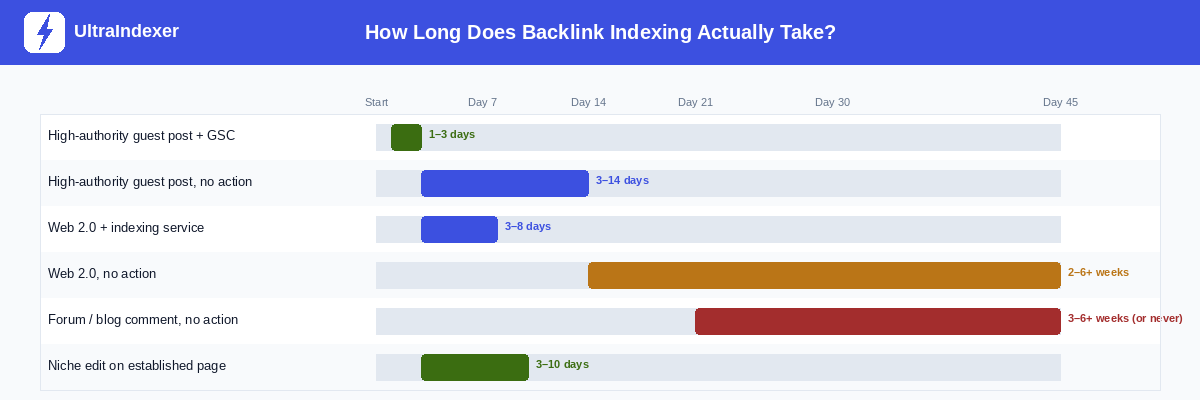
A few observations from this data:
GSC and a quality indexing service are the only methods that reliably get links indexed within the first week. Everything else involves waiting — sometimes a long time.
Niche edits on established pages consistently outperform new guest posts for indexing speed. If both options are available and you're running a campaign where speed matters, this is worth factoring into your link building strategy, not just your indexing process.
Web 2.0 properties with no action are genuinely unpredictable. Some index in two weeks. Others never do. If Web 2.0s are part of your strategy, use an indexing service rather than leaving them to natural discovery.
The agency workflow: indexing at scale
If you're managing link building campaigns for multiple clients, indexing needs to be a standard step in your process — not an afterthought you handle when a client asks why rankings aren't moving.
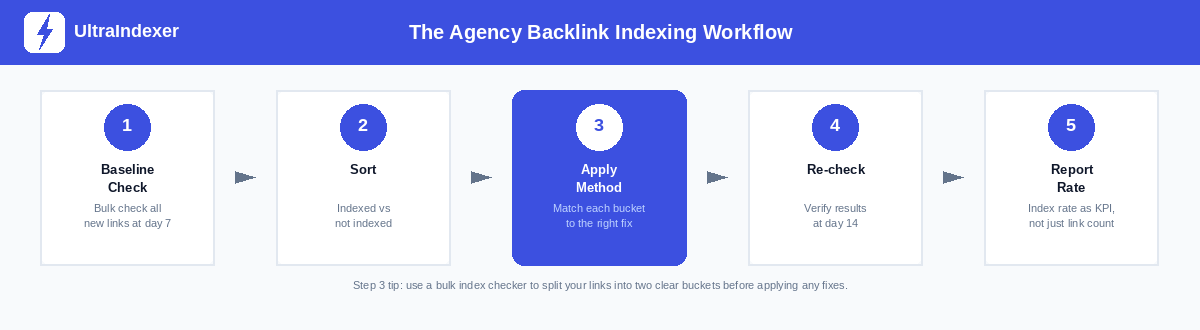
Here's how to build this into a repeatable system:
Step 1 — Baseline check at day 7. Seven days after a batch of links goes live, run a bulk index check on all of them. Don't wait longer — the sooner you catch unindexed links, the more time you have to act.
Step 2 — Sort into two buckets. Indexed and not indexed. That's it. Don't overthink the categories at this stage — just separate what's working from what isn't.
Step 3 — Apply the right method to each unindexed link. Use the decision matrix earlier in this guide. Links on sites you control go through GSC. Links on third-party sites go through an indexing service. Links on genuinely low-quality pages may need publisher outreach or should be written off.
Step 4 — Re-check at day 14. Run the bulk check again. The links that were indexed at day 7 should still be indexed. The links you treated in step 3 should mostly be indexed now. Any that still aren't after two interventions are worth investigating individually using the troubleshooting section above.
Step 5 — Report indexing rate, not just link count. This is the change that makes the biggest difference to how clients understand the value of your work. Instead of "we built 45 links this month," report "we built 45 links, 38 of which are now confirmed indexed and passing authority." That's a meaningful number. It tells the client something about quality, not just volume.
A good target for a healthy agency campaign: 70–80% of links indexed within 14 days. If you're consistently hitting that, your link quality and indexing process are working well together.
Your action plan: the next 24 hours, 7 days, 30 days
Next 24 hours. Check your existing live links. Pick your last 20 to 30 backlinks and run a site: check on each one. How many are actually indexed? That number — your current baseline — is the most important data point you'll get from reading this guide. Most people who do this check are surprised by the result.
Next 7 days. For any unindexed links you found: apply the decision matrix. GSC for links on sites you control. An indexing service for third-party placements. Social sharing for anything in between. Document what you did and when, so you can measure the result.
Next 30 days. Build indexing into your workflow as a standard step, not a reactive fix. Every new link that goes live should be logged. A bulk index check at day 7 should happen automatically. Your reporting should include indexing rate alongside link count.
Building backlinks without verifying they're indexed is like paying for a billboard in a city and never checking whether the poster was actually put up. If you want to index backlinks fast and consistently, the system matters as much as the tactics. The measurement is quick. The results are worth it.
Frequently asked questions
How long does it take Google to index a backlink?
It depends on the method you use and the quality of the linking page. A high-authority guest post submitted via Google Search Console can be indexed within 24 to 72 hours. The same post with no action taken might take 3 to 14 days. A web 2.0 property with no traffic and no indexing effort could take months — or never index at all. The timeline chart in this guide gives a full breakdown by link type and method.
What percentage of backlinks never get indexed?
There's no single definitive figure, but industry data and practitioner experience consistently suggest somewhere between 20% and 40% of backlinks in a typical campaign are never indexed by Google. The exact number depends heavily on the quality of links being built. Campaigns focused on high-authority, real-traffic placements will see much better indexing rates than campaigns using mass Web 2.0 or directory links.
Is it safe to use a backlink indexing service?
Yes — a legitimate indexing service that uses natural crawl signals (pinging, RSS feeds, social signals, tier-2 linking) is safe. What creates risk is aggressive or manipulative tactics: submitting thousands of URLs simultaneously in patterns that look artificial, or using networks of spam sites to generate fake crawl signals. When evaluating a service, look for one that publishes its methodology, provides per-URL reporting, and allows you to control submission pace.
How do I check if my backlinks are indexed when I have hundreds of them?
Manual checking with the site: operator works for small numbers but doesn't scale. For bulk campaigns, you need a dedicated index checker that accepts a list of URLs and returns indexed or not indexed status for each one. This is available as part of UltraIndexer's index checking product — you can submit up to 5,000 URLs per batch and get a clear, per-URL report back. Building this into a regular cycle (check at day 7, re-check at day 14) gives you a complete picture of your campaign's real performance.
What's the difference between a backlink being crawled and being indexed?
Crawled means Googlebot has visited the page and read its content. Indexed means Google has processed and stored that page — and, specifically for your backlink, evaluated the link, assessed its quality, and connected it to your domain's trust graph. A page can be crawled and still not be indexed if Google decides the content isn't worth storing. And a link on an indexed page might still not be passing value if it was placed in a footer, is surrounded by too many outbound links, or is on a page Google has deprioritised for quality reasons. Steps 4 through 6 of the indexing funnel at the start of this guide explain exactly what happens after crawling.
Ready to check how many of your existing backlinks are actually indexed? UltraIndexer's bulk index checker lets you upload up to 5,000 URLs and get a per-URL indexed/not indexed report back. No guesswork. Just data.
If you want to index backlinks fast without submitting them all at once, read our guide to drip feed indexing — it covers why submission pace matters and how to set it up correctly for large campaigns.
And if you're looking to improve your indexing rate going forward, UltraIndexer's backlink indexing service includes drip feed scheduling, per-URL 7-day reporting, and transparent indexing rates by link type — so you always know what you're getting.