Link Indexing Explained: What It Is, Why It Matters, and What It Costs You
There's a gap between building a backlink and getting ranking value from it. Most SEOs know this gap exists — they've seen campaigns where links appear in Ahrefs but rankings don't move. What they're often missing is a clear explanation of what actually happens in that gap, and why link indexing is the step that determines whether the gap closes at all.
This guide explains what link indexing is as a concept, why it's a separate discipline from link building, what happens to your ROI when it fails, and how it fits into a practical campaign workflow. It doesn't repeat the how-to content from our guide to indexing backlinks fast — if you're looking for specific methods, start there. This guide is about understanding the concept before applying the tactics.
What is link indexing?
Link indexing is the process by which Google discovers a backlink, evaluates it, and adds it to its index — the point at which that link begins contributing to the ranking calculations for the page it points to.
It's worth being precise about this, because "indexed" gets used loosely. When we say a backlink is indexed, we mean specifically that Google has:
Until all four of those things have happened, the link exists — but it isn't working. It's text on a page that Google may or may not have seen, and may or may not have decided to act on.
This is a different thing from the linking page being indexed. A page can be in Google's index — confirmed via GSC — and still have links on it that Google hasn't processed into its authority calculations. Getting the page indexed is a prerequisite. Getting the link indexed is a subsequent step.
Link indexing vs link building — two different disciplines
This distinction matters more than most SEOs treat it.
Link building is about acquiring placements — getting your URL placed on other sites through outreach, content creation, paid placements, or digital PR. The output of link building is a link that exists somewhere on the web.
Link indexing is about getting that placement processed by Google. The output of link indexing is a link that is in Google's index and passing authority to your site.
These are sequential steps, not the same step. You can do one without completing the other. And treating them as identical — reporting on links built rather than links indexed — creates a consistent gap between what gets delivered and what actually improves rankings.
The simplest way to think about it: link building puts the poster up. Link indexing is confirming the billboard is actually visible to the audience it's supposed to reach.
Most link building workflows end at the first step. A link is built, added to a spreadsheet, and reported to the client. Whether Google has processed that link is a follow-up question that often never gets asked — until rankings fail to move and nobody can explain why.
The full journey from link built to ranking impact
Understanding the timeline helps set accurate expectations — both for your own work and for clients who ask why rankings haven't moved two weeks after a link went live.
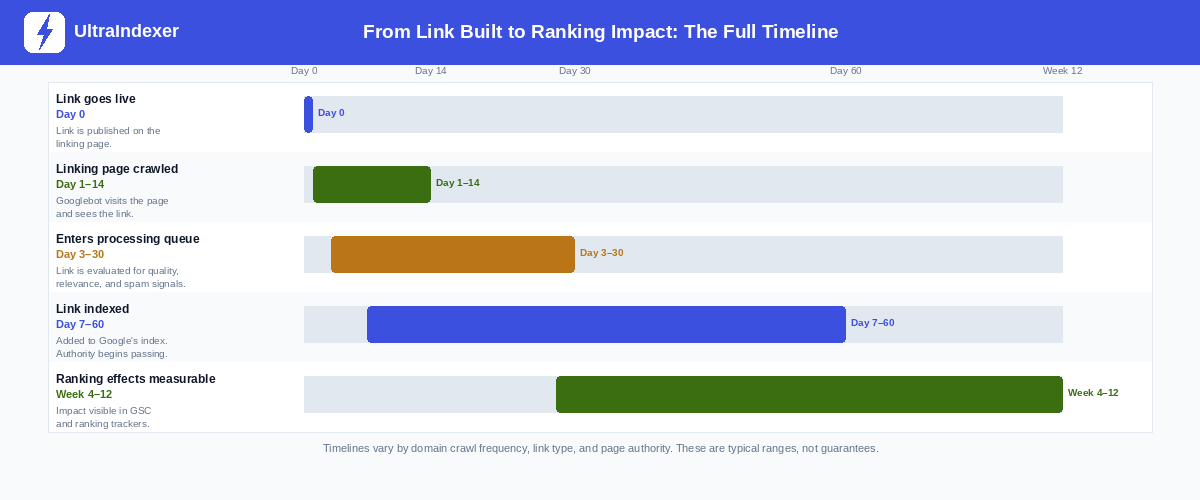
Day 0 — Link goes live. The link is published on the linking page. At this point it exists as HTML. Nothing else has happened yet.
Day 1–14 — Linking page gets crawled. Googlebot visits the page containing the link. This depends entirely on the crawl frequency of the linking domain. A high-authority news site might be crawled within hours. A low-traffic blog might wait days or weeks before Googlebot returns.
Day 3–30 — Link enters Google's processing queue. Google evaluates the link against quality signals, relevance criteria, and spam filters. This is where most low-quality links are dropped. Links that pass proceed to indexing.
Day 7–60 — Link is indexed. The link is added to Google's index and begins passing authority to your site. The wide range here reflects the difference between a high-authority editorial link (indexed quickly, strong signal) and a web 2.0 property on a domain Googlebot visits infrequently (indexed slowly, weaker signal).
Week 4–12 — Ranking effects become measurable. This is the stage most people are impatient about, and the most important one to understand. Ranking effects are separate from indexing. A link can be indexed on day 10 and not produce a measurable ranking movement for another six weeks. Google evaluates the stability of the link, the overall context of your link profile, the competitiveness of your target keywords, and many other factors before reflecting the link's authority in rankings.
What this means in practice: if you're checking rankings two weeks after a link campaign ended, you're measuring too early for most of the links to have completed the full journey. The absence of ranking movement at week 2 tells you almost nothing about whether the campaign worked.
What unindexed links cost you
This is the economic argument that rarely gets made explicitly, and it changes how you think about link indexing as a line item in a campaign budget.
If you build 20 links in a month and 6 of them never get indexed, your effective campaign output is 14 links — not 20. You've paid for 20 placements, spent 20 units of outreach time or budget, and received the SEO value of 14.
That's a 30% reduction in ROI, silently, with no warning from your link tracking spreadsheet. The 6 unindexed links still appear in your reporting — still show in Ahrefs, still listed in your delivery document — but they're contributing nothing to rankings.
Extend this over a 6-month campaign at 20 links per month with a consistent 30% non-indexing rate, and you've delivered 72 effective links out of 120 built. That's 48 link placements — real outreach effort, real budget — producing zero SEO return.
The correct metric is cost-per-indexed-link, not cost-per-link-built. An agency that verifies indexing and reports on confirmed-indexed links rather than built links is giving clients an honest picture. An agency that doesn't check is implicitly inflating their delivery numbers.
This doesn't require obsessing over every link. It requires building an indexing check into the campaign workflow as a standard step — which takes less time than the reporting it improves.
What SEO tools show vs what Google has actually indexed
This is probably the most common misconception in link building, and it quietly causes more confusion than almost anything else.
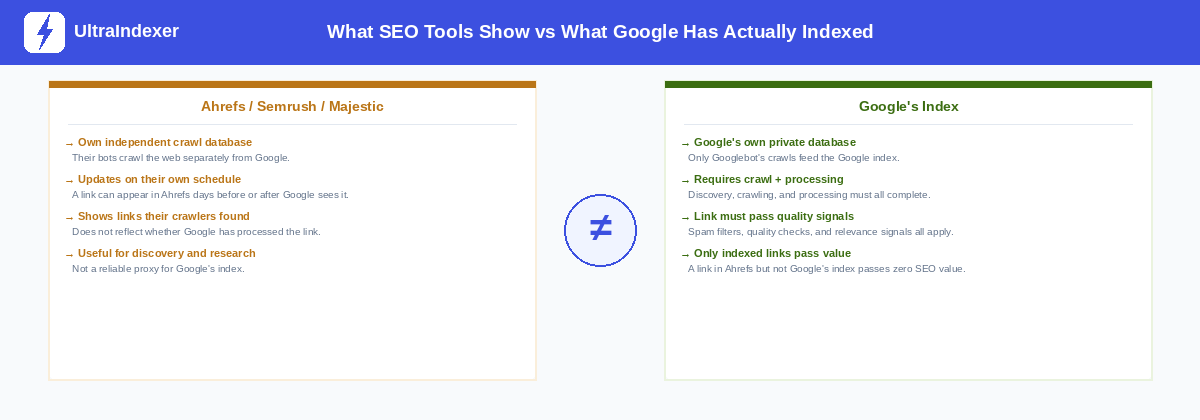
Ahrefs, Semrush, Majestic, and similar tools maintain their own crawl databases. Their bots crawl the web independently of Googlebot and store what they find. When a link appears in Ahrefs, it means Ahrefs' crawler found it. That's all it means.
It says nothing about whether Google has found the link, processed it, or added it to its index.
A link can appear in Ahrefs within 24 hours of going live and still not be in Google's index two weeks later. The reverse is also possible — though less common — where Google processes a link before third-party tools discover it.
This matters because most link building reporting is based on third-party tool data. "We built 20 links — here's the Ahrefs screenshot" is the standard format. But that screenshot confirms that Ahrefs found the links. It doesn't confirm that Google has indexed them. For a full breakdown of why links go missing from Ahrefs reports — and how to verify them against Google instead — see backlinks not showing in Ahrefs.
The only ways to check what Google has actually indexed are: the site: operator in Google Search, Google Search Console URL Inspection (for pages you own), and a dedicated bulk index checker for third-party URLs. Our guide to checking URL indexing covers all three methods in detail.
What an unindexed link tells you
When a link persistently fails to index despite reasonable attempts to encourage it, that's worth treating as diagnostic information — not just a technical problem to fix.
A backlink that won't index is usually telling you something about the linking page, not about your site. The most common causes are:
The linking page itself isn't indexed. This is the most common cause and the first thing to check. A link on an unindexed page has no path into Google's authority graph regardless of what you do to it. Check whether the page is indexed before spending time on any other fix.
The linking domain has a very low crawl budget. Some smaller sites get visited by Googlebot infrequently — once a week, once a month, or less. Links on these pages wait in a long queue behind everything else on the domain. This isn't fixable from your end. It's a characteristic of the linking site.
The content on the linking page is thin. Google has become more selective about indexing pages it considers low-quality. A page with 150 words of generic content, five outbound links, and no internal links is a candidate for being crawled and then not indexed. Your link on that page faces the same fate as the page itself.
The link placement is in a deprioritised location. Links in footers, sidebars, and comment sections carry less weight and are processed with lower priority than links inside the main content body. A link buried in a footer on a thin page may be crawled and simply set aside.
Understanding these causes changes how you evaluate link suppliers and link quality. A supplier whose links consistently fail to index isn't delivering what they're charging for — regardless of the DR or DA numbers they show you.
Three misconceptions about link indexing
Misconception 1: "All my links will index eventually — I just need to be patient"
Some will. Some won't. A backlink on a page that Google has decided doesn't merit indexing will sit unindexed indefinitely. Waiting longer doesn't fix a quality problem on the linking page. If a link hasn't indexed within 30 days and the linking page is confirmed indexed, that's a signal worth investigating — not a reason to wait another 30 days.
Misconception 2: "Indexed means it will improve my rankings"
Indexing is a prerequisite, not a guarantee. An indexed link on a low-quality page pointing to your site with irrelevant anchor text, from a domain Google has already decided carries little authority, will be indexed and contribute very little. Getting a link indexed is the necessary first step for it to work — but the amount of work it does depends on link quality, relevance, and many other factors that indexing alone doesn't change.
Misconception 3: "If Ahrefs shows it, Google has it"
Ahrefs' crawler is not Googlebot. They operate independently. A link appearing in Ahrefs means Ahrefs found it. Whether Google has found it, processed it, and added it to its index is a separate question that requires a separate check. This distinction is the whole reason dedicated index checkers exist — because the data you need isn't available from third-party SEO tools.
Where link indexing fits in a campaign workflow
Link indexing isn't a separate project — it's a step in the standard campaign lifecycle that comes after link building and before reporting. Here's where it sits:
Step 1 — Build or acquire the links. Standard outreach, content creation, or link placement process. The output is a URL on a third-party page with your link present.
Step 2 — Verify the links are live. Before doing anything else, confirm the URL loads, the page is accessible, and your link is present in the content. This catches broken placements, removed links, and publisher errors before you spend indexing budget on them.
Step 3 — Submit to an indexing service or allow natural discovery. High-authority editorial links on active, well-crawled sites will often index naturally within days. Lower-authority links, web 2.0 properties, and links on less frequently crawled domains benefit from a dedicated submission. For larger campaigns, use drip feed scheduling — see our guide to drip feed indexing for how to structure this.
Step 4 — Check indexing status at day 7. Run a bulk index check on all submitted links at the 7-day mark. This gives you a clear picture of what's indexed and what needs attention before the campaign reporting window closes.
Step 5 — Triage and resubmit unindexed links. For links that haven't indexed, check whether the linking page is indexed, confirm the link is still present, and resubmit with a longer schedule. Our guide to indexing backlinks fast covers the full triage process.
Step 6 — Report on indexed links, not just built links. The number that matters to a client is confirmed-indexed links — links that are in Google's index and passing authority. Reporting built links without checking indexing status overstates delivery and understates the remaining work.
Adding steps 4 and 6 to an existing workflow takes less than an hour per campaign. The clarity they add to reporting — and the problems they catch before a client sees an underwhelming ranking report — is worth considerably more than that.
Frequently asked questions
What is the difference between link indexing and link building?
Link building is the process of acquiring backlink placements on other websites. Link indexing is the subsequent process of getting those placements discovered, processed, and added to Google's index. Link building produces links that exist. Link indexing produces links that are working. You need both — acquiring links that never get indexed produces no SEO value regardless of their quality.
How long does link indexing take?
It varies significantly based on the crawl frequency of the linking domain, the quality of the linking page, and the authority of the linking site. A link on a high-authority, frequently crawled domain can be indexed within a few days. A link on a low-traffic web 2.0 property may take weeks, or may never index at all. The timeline chart in this guide shows the typical ranges at each stage of the journey.
Do all backlinks eventually get indexed?
No. A meaningful proportion of backlinks — particularly those on low-quality pages, pages with thin content, or pages that Google has decided not to prioritise — will not get indexed regardless of how long you wait. A link on an unindexed page faces an additional barrier: the page itself must enter Google's index before the link can be processed. Waiting indefinitely is not a strategy for these links.
Why does Ahrefs show a link that Google hasn't indexed?
Ahrefs operates its own independent crawl infrastructure, separate from Googlebot. When Ahrefs finds a link, it adds it to Ahrefs' database. This says nothing about whether Google has crawled, processed, or indexed the same link. The two systems are entirely independent. A link can appear in Ahrefs for months before Google processes it — or never be processed by Google at all despite appearing in every third-party tool.
Is link indexing the same as page indexing?
No, though they're related. Page indexing means Google has added a page to its search index — the page can appear in search results. Link indexing means Google has processed a specific backlink on that page and connected it to the destination site's authority graph. A page being indexed is a prerequisite for the links on it to be indexed. But a page being indexed does not automatically mean every link on it has been processed and is passing value.
Once you understand what link indexing is, the next step is knowing how to check whether your links are actually indexed. Our guide to checking URL indexing covers all four methods, including how to check third-party backlinks at scale without Google Search Console access.
If you need to actively improve your indexing rate, how to index backlinks fast covers every practical method with a decision matrix for choosing the right approach based on your situation.
For campaigns with 50 or more links, UltraIndexer's backlink indexing service handles submission with drip feed scheduling, per-URL 7-day reports, and transparent indexing rates by link type.